Add MobilityArena as a preferred source on Google
The Vivo X51 5G has launched in Europe as the latest addition to the company’s number of 5G devices. This new entrant seems to be a rebranding of the X50 Pro, which launched in June. It has the Qualcomm Snapdragon 765G SoC under the hood, and features four rear cameras with a Gimbal camera as part of its setup.
The dual-SIM (Nano) Vivo X51 5G launched with the Funtouch OS 10.0 based on Android 10 and brings 256GB of onboard storage to the table. It is built around a 6.56-inch full-HD+ (2,376×1,080 pixels) AMOLED display with a 20:9 aspect ratio and a 90Hz refresh rate.
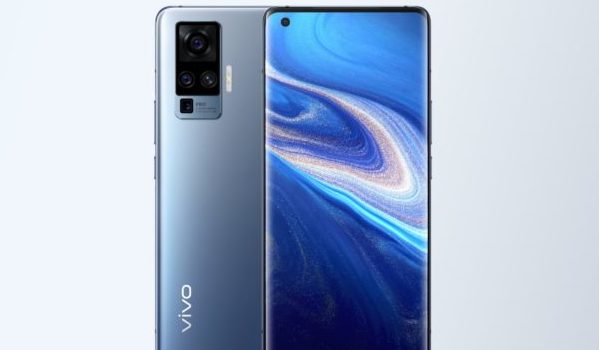
Under the hood, the octa-core Qualcomm Snapdragon 765G SoC is hooked to 8GB of RAM and also supports 5G technology.
In the camera department, this smartphone’s four rear cameras consist of a 48MP primary sensor assisted by a 13MP secondary sensor, an 8MP ultra-wide angle sensor and an 8MP zoom sensor. Up front, a 32MP sensor in a hole-punch cutout takes care of selfies and video calls.
The Vivo X51 5G launched in the UK with a single colour option, the Alpha Grey colour. It also brings a 4,315mAh battery that supports 33W fast charging. It is currently limited to the European market (Italy, France, Germany, Poland, and Spain) with no details yet telling us when this smartphone will reach other markets.
In terms of storage, the Vivo X51 5G launched with a lone storage variant, an 8GB+256GB variant which costs £749($980). It weighs 181.5 grams and measures 158.46×72.80×8.04mm.
Vivo X51 5G Price and Specs
- OS: Android 10 with FunTouch OS 10.0
- Release Date: October 2020
- RAM: 8GB
- ROM: 256GB
- Network Type: 3G/4G/5G
- Selfie Camera: 32MP
- Rear camera: 48MP+13MP+8MP+8MP
- Display: 6.56-inch full-HD+ (2,376×1,080 pixels) AMOLED display with a 20:9 aspect ratio and a 90Hz refresh rate
- Battery: 4,315mAh with 33W fast charging
- Processor: Qualcomm Snapdragon 765G SoC
- Price: $980
References
- Source ;
- Source .
- Don’t miss our reviews .
- Follow our news on Google News .
- Join our WhatsApp Group , to be notified of the most important articles and deals,
- Follow us on Instagram , Facebook , Twitter , and YouTube .
Author:Alfa Baye
Staff Writer
Add MobilityArena as a preferred source on Google
There are many reasons for wanting to create a mobile application. Maybe you’re looking to expand your business or have an idea for a new app that could potentially take off. Whatever reason you have for wanting to create a mobile app is a good one, however, it’s no secret that building one is not easy.
Should you pay someone else to do it for you or watch an online tutorial and figure it out yourself? Is it easy enough to do by yourself? This article will provide the best ways to create an app that’s compatible with both Apple and Android devices.

1. Use a Professional App Building Service
The easiest way to get something done is always to pay someone else to do it for you. With this option, you’ll find a plethora of app development companies at your fingertips in this increasingly digital age.
The benefit of having a service do the work for you is that you’ll have a product that has a more professional look, functions quickly, and serves whatever purpose you need.
A service like Nexrage Studios that provides fast, beautiful, and efficient mobile apps is where you’ll want to look. You can take a look at their services at nexrage.com/mobile-development .
2. Use a Free Online App Builder
For many people, one of the barriers to creating an app is cost. To combat this, you could use a free online app builder. These are easy to access and often easy-to-use with clear instructions.
Even better, many of the online builders pride themselves on being “no-code” which means you don’t have to know a bit of coding to create the perfect app to fit your needs.
These websites often offer other resources like website building, task automation, and graphic design. These platforms are especially recommended for those who want an easy, quick, and easy-on-the-wallet app.
3. Learn How to Code
There are also endless amounts of books, videos, and online articles that will walk you through the steps of learning how to code.
It’s important to note that this method is definitely not an easy route to take or a fast one. It will take time to learn how to code effectively so make sure to add enough space to learn in your launch schedule.
4. Use a Paid Online App Builder
The last option is to use a paid online app builder. The difference between a paid online service and a free one is the number of customizable options you’ll have and the quality of the design.
A paid mobile app builder will be easier to use and most likely take less time. There will be many more options to pick the perfect look and style to fit your business or personal needs.
If the cost of these services is an issue then do not fret. Free online builders are still able to give you the mobile application you desire but will just require a bit more time and effort.
Conclusion
Having a mobile app is the thing you need to take your small business or great idea to the next level. Building one can seem stressful upfront but it doesn’t have to be a hassle. Taking advantage of the many app building options out there will make the process of creating one easy.
