Add MobilityArena as a preferred source on Google
| Quick Specs Of Vivo Y31 (2021) |
|---|
| OS: Android 11. Release date: January 2021. Network Type: 2G/3G/4G Display: 6.58-inch, 2408×1080 pixels resolution Processor: Snapdragon 662 Selfie Camera: 16 MP Main camera: 48 MP triple RAM: 6 GB ROM: 128 GB Battery: 5000 mAh. Phone Status: Official. |
Vivo Y31 (2021) Full Specs, Features, Photos
Mobile Wireless Network and Software
- 2G mobile network bands : GSM, GPRS, EDGE 850 / 900 / 1800 / 1900 MHz.
- 3G mobile network bands : UMTS, WCDMA, HSDPA 850 / 900 / 2100 MHz
- 4G mobile network bands : 1 / 3 / 5 / 8 / 38 / 40 / 41.
- 5G mobile network bands : No.
- SIM Type : Nano-SIM, Dual SIM
- Software / OS : Funtouch OS 11, based on Android 11
Design, Form Factor, Appearance
- Dimensions : 163.9 x 75.3 x 8.4 mm
- Weight : 188g
- Display : 6.58 inches, 2408×1080 pixels, 20:9 aspect ratio, IPS LCD screen
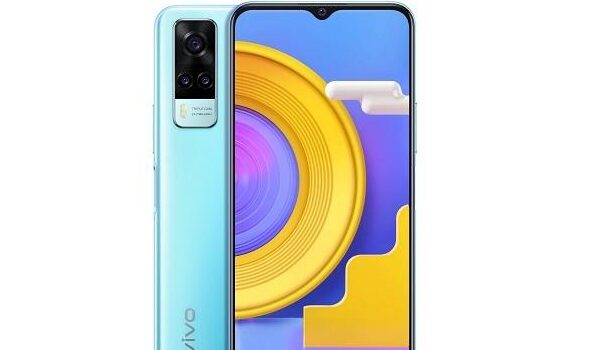
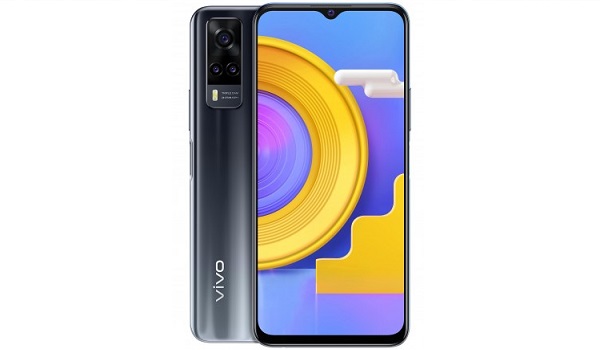
- Colours : Racing Black. Ocean Blue.
- Physical Build : Plastic
Internal Hardware Specs
- Processor Type : 64-bit, 2.0 GHz Octa-core, Kryo 260
- Processor Name : Qualcomm Snapdragon 662 (11nm)
- Graphics Processor : Adreno 610
- RAM : 6 GB
- Internal Storage : 128 GB
- External Storage : microSD, up to 1 TB (dedicated slot)
Photography, Video Recording
- Main Camera : 48MP primary sensor + 2MP depth sensor + 2MP macro lens, auto-focus, dual LED flash, 1080p@30fps video recording
- Front Camera : 16 MP, Face ID/Recognition, 1080p@30fps video capture
Audio, Video Playback
- Music Support : PCM, AAC / AAC + / eAAC + / MP3 / AMR – NB / WB / APE
- Audio : 3.5 mm audio jack
- Loudspeaker : Mono speaker
- Video Support : H.264/MP4/MPEG4 player
- FM Radio : .
Phone Sensors
- Digital Compass : No.
- Accelerometer : Yes.
- Proximity Sensor : Yes.
- Ambient Light Sensor : Yes.
- Barometer : No.
- Pedometer : No.
- Heart Rate Monitor : No.
- Gyroscope (G-Sensor) : Yes.
- Fingerprint Scanner : Yes; side-mounted.
- Face Unlock : Yes.
- Iris Scanner : No.
- Motion Sensing / Gesture Control : No.
- Voice Control : No.
- Intelligent Digital Assistant : Yes; Google Assistant.
- Infra-red Sensor : No.
Connectivity Options
- Bluetooth : v5.0, A2DP
- WiFi : Wi-Fi 802.11 a/b/g/n/ac, hotspot
- GPS : Yes; A-GPS, GLONASS, GALILEO, BDS
- USB : microUSB v2.0. Type-C 2.0. USB-OTG.
- NFC : No.
Miscellaneous Specs and Features
- Battery Type and Capacity : Non-Removable Lithium-Polymer 5000 mAh
- Battery Charging : 18W fast charging (0-70% in 67 minutes)
- Wireless Charging : No.
- Reverse Charging : Yes.
- Model Version/Number :
Vivo Y31 Price and Launch Date
- Announced : January 2021
- Release Date : January 2021
- Price in India : INR16,490 ($225/€185).
MobilityArena Buyer’s Guide Verdict
Not available.
Our Buyer’s Guide Verdict is recommendation that we make based on our evaluation the specs of the device. It is a general guide designed to help you understand how much value a smartphone offers for its price. It is not a stamp of quality assessment or an endorsement of the device or of the manufacturers. Be sure to ask questions and use your judgement when buying any device, as MobilityArena may not be held responsible for your buying decisions .
Vivo Y31 Phone Review Rating
Not available.
Author:InfoDesk
Add MobilityArena as a preferred source on Google
If you are tired of seeing those pesky notifications to install this app or that in folders in your smartphone, I have written this guide to show you how to remove recommended apps in Xiaomi phones (remove promoted apps from MIUI folders). One of the most propagated untruths by fans on the Internet is that there are no ads on Xiaomi phones (this includes Poco and Redmi phones).
I have owned, used, and reviewed a handful of Xiaomi phones, and I experienced ads in them all. I currently use a Xiaomi Mi Note 10 Pro , and it has ads everywhere – ads in the notification menu, ads inside the music app and other apps, and ads in folders. PS : See my Xiaomi Mi Note 10 Pro review (opens in new tab).
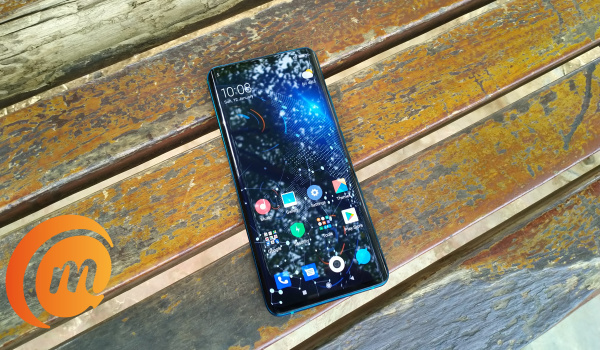
Xiaomi’s MIUI is riddled with ads. And this is no surprise. Xiaomi’s business model is that they make money from data to subsidies the cost of their phones. That means ads and use of your personal data. That is why Xiaomi phones are more affordable than competing phones from most other brands.
When I point out the presence of ads, Xiaomi fanboys and girls are also quick to point out that the ads can be disabled. What they do not tell you is that you have to dig around into settings scattered all over the place to do so.
It looks like a deliberate design to frustrate users from getting rid of all of the ads. I can’t think of any other reason why the process is this convoluted. In this article, I show you how to remove promoted apps from MIUI folders and stop getting those pesky ads and notifications everywhere else.
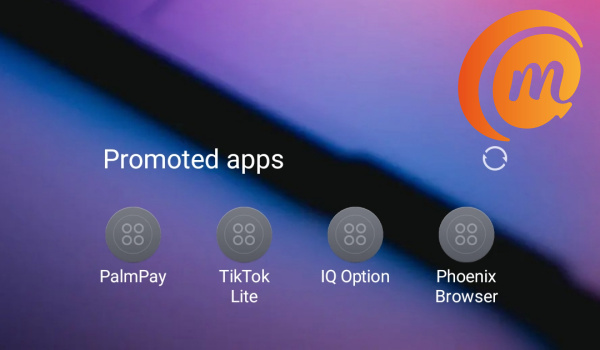
You can turn off or remove promoted apps from MIUI in Xiaomi phones
As MIUI 12 is the latest version of Xiaomi’s software, and the version I have on my Mi Note 20 Pro, this guide is based on MIUI 12.
- How to remove Promoted Apps from MIUI folders
- How to disable Personal Ad Recommendations in MIUI 12
- How to get rid of system ads in MIUI 12
- Get rid of or remove promoted apps from MIUI, e.g. Music, File Manager, Browser, etc, in MIUI 12
How to remove Promoted Apps from MIUI folders
For a long time, I couldn’t find out how to stop Folders on my Xiaomi phone from displaying promoted apps – basically ads promoting apps. I did find it. Here’s how to remove them.
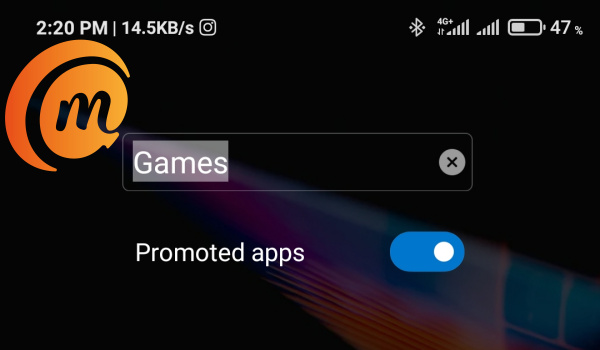
You have to go to each folder where the promoted apps are showing. Open the folder and tap on the name. Right below the name will appear a “Promoted Apps” slider (as seen in the screenshot below). Toggle the slider to disable promoted apps and that’s it.
How to disable Personal Ad Recommendations in MIUI 12
This setting allows Xiaomi to collect all sorts of personal data of yours for use in recommending ads to you. To stop that from happening, follow these steps:
- Go to Settings ,
- Select Privacy
- Scroll down to Ads and select it
- Toggle Opt out of Ads Personalisation to disable it.
Next, go back to your Settings main page, and type Ad Services in the search box there. A menu by that name will show up in the search results. Select it, and toggle “Personalised ad recommendations” to disable it. Don’t get tired now; you are just about half way through.
How to get rid of system ads in MIUI 12
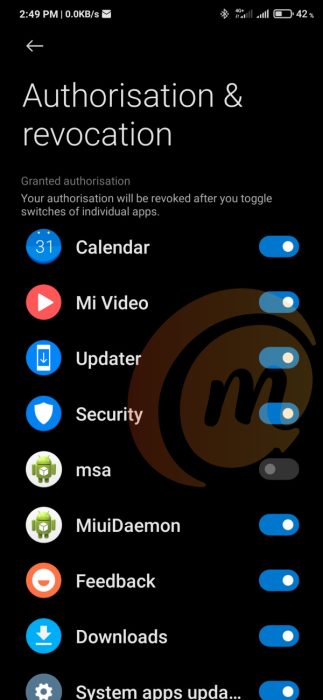
Make sure you have an active Internet connection on your phone for this part. Go back to Settings, and scroll down till you see Passwords & Security. Select it and follow these steps:
- Scroll down and select Authorization & revocation
- Find msa on the list and toggle the button next to it to disable it.
- After 10 seconds, you are presented with a Revoke button. Hit it and that should be it.
If it doesn’t work out the first time, try it again till it does. This msa guy is can be quite stubborn on occasion.
Get rid of or remove promoted apps from MIUI, e.g. Music, File Manager, Browser, etc, in MIUI 12
And this is the last leg! Apps often show up while using a number of apps in Xiaomi phones. These apps are Xiaomi’s own apps and include Music, File Manager, Browser, and Security app.
You have to open each of these apps one by one and execute the following procedure: Go to the settings of the app in question and look for menus that say things like Receive recommendations , Receive referrals , or Show ads . Toggle the menu slider to disable these options . Like I said, you have to do it for each app. Once done, you’re good.
As you can see, it is a mostly tedious work to get rid of all ads on Xiaomi and Redmi phones. But you are done now and should be able to enjoy a nuisance-free usage of your smartphone.
If your Xiaomi or Redmi phone runs an older version of MIUI, the steps will vary mildly, but you should be able to find all the above menus and settings to remove promoted apps, system ads, as well as ads in individual apps.
- Don’t miss our mobile phone reviews .
- Follow our news on Google News .
- Follow us on Instagram , Facebook , Twitter , and YouTube .
Author:Mister Mobility
Digital Skills and Communication Coach | Mobile Phone Connoisseur since 2001 | Tech Blogging since 2004
