Add MobilityArena as a preferred source on Google
High Dynamic Range (HDR) is the latest upgrade to picture quality of your smartphone, TV, and other streaming devices; here is all you need to know about HDR cameras in mobile phones.
What is HDR camera in smartphones?
HDR is a photography process which has been in use for years, especially on mobile phone cameras. Its popularity has now soared due to the HDR+ functionality on Google Pixel XL, which hit the markets in 2016.
Away from the introduction, let’s discuss all you need to know about HDR cameras, highlighting the steps to use this feature on your mobile device (whether Android or iOS).
- What Is High Dynamic Range (HDR)?
- Understanding HDR 10 Support
- Taking Photos with a HDR Camera in a smartphone
- When to use the HDR Camera in your phone
- When to avoid using the HDR camera in your phone
What Is High Dynamic Range (HDR)?
HDR is a technique for adding more dynamic range (the ratio of light to dark in a photograph) to your photos. Rather than capturing only 1 photo, HDR makes use of 3 photos, each taken at different exposures. You can now use image-editing apps to put these 3 images together & highlight the best parts of each of them.
The HDR camera in your cell phone will do all the work for you. When you take a picture, it produces a regular and an HDR photo. Consequently, what you will get is a picture that looks more like what your eyes see, rather than what the cam sees. This is why when you enable HDR mode, your phone will take a slightly longer time to capture the photo, as it captures 3 pictures, instead of just 1, and processes them to deliver richer results.
Understanding HDR 10 Support
Content in HDR has its own specific formats and is not just a filter applied to normal footage. HDR10 is that HDR standard, featured in a lot of smartphones and smart TVs today. There are no licensing fees attached to it since it is an open-source format. Thus, cell phone manufacturers can provide support for it without any restrictions.
High dynamic range 10 is compatible with content delivering up to 4000 nits, in addition to 10-bit colour & the REC.2020 colour gamut (Nit is a measure of brightness). Put in a simpler way, HDR footage can be mastered using enhanced colour as well as highlight greater details, which will yield improved picture quality.
Concerning HDR videos, it equally has attached metadata, which enables a phone or TV screen to tailor footage to be appropriate for the capabilities of the specific display in question. For example, no smartphone or consumer TV can precisely display the full colour depth in the REC.2020 format that can be used in HDR10.
But, it can get close as much as possible with that info (metadata). Some cell phones — the likes of Apple’s iPhone XS Max, iPhone 11, iPhone 11 Pro — come with support for Dolby Vision. This is a higher-spec HDR standard that accommodates even brighter screens displaying 12-bit colour.
Also, the standard contains variable metadata, which implies content developers can freely adjust how a movie interacts with a display, one scene after the other.
Taking Photos with a HDR Camerain a smartphone
All you need to know about using HDR cameras in phones
You can enable HDR by launching your phone’s native camera app. Locating the setting to activate HDR is quite straightforward, but the steps vary from one device make and model to the other.
In addition to these, HDR may come under different names based on a phone’s make and model. While some manufacturers call it “Dynamic Tone” or “Rich Tone”, others opt for “Drama”. If you find hard locating the HDR setting on your handset, you can get tips in the device manual or on your manufacturer’s blog.
Alternatively, you can purchase a 3rd-party app on the Play Store for Android and the App Store for iOS. These are some recommended apps you can try:
- Android: Pro HDR Camera , HDR Camera
- iOS: Pro HDR , HDR Camera+
When to use the HDR Camerain your phone
You would need HDR mode in the following scenarios:
Landscapes : There is usually a lot of contrast between the earth and sky in large landscape photos, which is why several smartphone cameras find it difficult capturing the distinct difference in contrast with their small sensor.
Taking your landscape pictures in HDR mode will enable you to get the details in the sky without having to compromise the earth or land by being too dark.
Also, the feature works for the opposite case, in which you are capturing the land with your cam without blowing out the sky. Here, HDR will offer you 3 different exposures, which are dark, light as well as balanced. And that would help immensely as the subjects in the photography are so starkly contrasted.
Portraits in sunlight : As you may well be aware, one of the most important parts of photography is lighting since the major thing you’re doing when taking a picture is painting with light.
During those times of the day with harsh sunlight, it can introduce dark shadows and glares to your photo, and these could be aesthetically displeasing. You can turn on HDR to help nip this issue in the bud.
For example, if you notice that your picture is dark as a result of too much backlight, HDR will brighten the foreground up without totally washing out those spots that are well lit in the photos. Also, HDR can ensure your photographs look crisp and colour richer.
Low light (without flash) : This is much related to harsh light scenarios discussed above as it’s a case of having too much but not enough light. By merging the 3 HDR images, it becomes possible to capture the shadows, highlights as well as details, all of which will otherwise be lost if a single image is taken.
When to avoid using the HDRcamera in your phone
As you might have observed, when you use HDR sometimes, it makes your photos look worse. It is better to take your pictures without HDR in the following situations:
Photos of subjects in motion : HDR will increase the chance of a blurry photo if any of the subjects is moving or could move. Since HDR captures three images, if your subject moves between the 1st shot and the 2nd one, the final picture will have a poor look.
Vivid colors : In a situation where your scene is too light or dark, HDR will help bring some of the colour back. But if there are very vivid colours, HDR can wash them out.
High-contrast scenes : Certain pictures have a better look when there is a stark contrast between the light and dark parts of the images; for instance, in a scenario where there is a dark shadow or silhouette you would like to highlight. HDR mode will make this less intense, and that would deliver a less interesting photo.
Fortunately, the majority of HDR camera smartphones will offer you 2 images — one shot when HDR is off, and the other when it is on. So, you can always try the feature and observe what the comparison will look like before you put it off completely.
Author:Tijani Mustapha
Deji is a web content developer and tech writer, who is passionate about tech-related topics and issues. A graduate of Physics from the University of Ibadan, he loves writing, conducting research, playing football, and meeting people of diverse backgrounds and interests.
Add MobilityArena as a preferred source on Google
Samsung Galaxy S20 Plus Quick Specs : Android 10 smartphone. Announced February 2020. Features a 6.7″ Dynamic AMOLED display, Snapdragon 865 or an Exynos 9830, 8GB RAM, quick charge, 10 MP selfie camera, 12MP rear quad camera, up to 512 GB internal memory, and a 4500 mAh battery.
Phone Status : Samsung Galaxy S20 Plus is one of the number of smartphones in Samsung’s 2020 flagship line-up. The others include Samsung Galaxy S20, and Samsung Galaxy S20 Ultra.
Samsung Galaxy S20 Plus Specs and Features
Mobile Wireless Network and Software
- 2G mobile network bands : GSM, GPRS, EDGE 850 / 900 / 1800 / 1900 MHz.
- 3G mobile network bands : UMTS, WCDMA, HSDPA 850 / 900 / 1900 / 2100 MHz
- 4G mobile network bands : LTE 1(2100) / 2(1900) / 3(1800) / 4(1700/2100) / 5(850) / 7(2600) / 8(900) / 2(700) / 13(700) / 17(700) / 18(800) / 19(800) / 20(800) / 25(1900) / 26(850) / 28(700) / 32(1500) / 38(2600) / 39(1900) / 40(2300) / 41(2500) / 66(1700/2100)
- 5G mobile network bands : 5G variant only.
- SIM Type : Nano-SIM, Dual SIM
- Software / OS : Android 10 + One UI 2.0
Design, Form Factor, Appearance
- Dimensions : 161.9 x 73.7 x 7.8 mm
- Weight : 188g
- Display : 6.7 inches, 1440 x 3200 pixels pixels, 20:9 aspect ratio, 120Hz, Dynamic AMOLED display, Corning’s Gorilla Glass
- Colours : Midnight Black. Vacation Blue. Hillier Purple.
- Physical Build : Glass front and back

Internal Hardware Specs
- Processor Type : 64-bit, 2.8 GHz Octa-core, Kryo 585
- Processor Name : Qualcomm Snapdragon 865 / Exynos 9830 – dependent on region.
- Graphics Processor : Adreno 650
- RAM : 12 GB
- Internal Storage : 128GB/256GB/512GB
- External Storage : microSD, up to 1TB (dedicated slot)
Photography, Video Recording
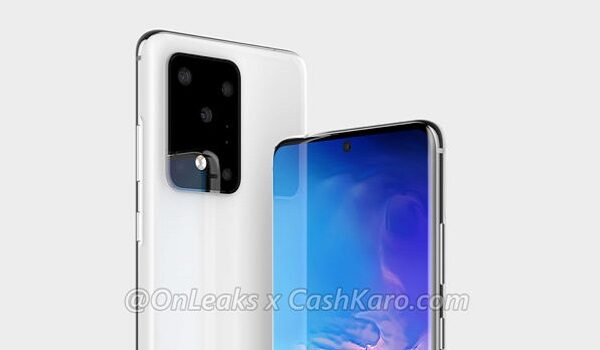
- Rear Quad Camera : 12MP Samsung ISOCell S5KGW2 + 64MP Sony IMX 555 main + 12MP telephoto + 0.3MP ToF, LED flash, 8k@30fps, 4k @60fps video recording, HDR+
- Front-facing Camera : 10 MP, Face Recognition, Selfie Smart Angle, 2160p@30fps video capture.
Audio, Video Playback
- Music Support : PCM, AAC / AAC + / eAAC + / MP3 / AMR – NB / WB / APE
- Audio : No headphone jack
- Loudspeaker : Mono speakers
- Video Support : H.264/MP4/MPEG4 player
- FM Radio : Yes.
Phone Sensors
- Digital Compass : Yes.
- Accelerometer : Yes.
- Proximity Sensor : Yes.
- Ambient Light Sensor : Yes.
- Barometer : No.
- Pedometer : No.
- Heart Rate Monitor : No.
- Gyroscope (G-Sensor) : Yes.
- Fingerprint Scanner : Yes; in-display.
- Face Unlock : Yes.
- Iris Scanner : No.
- Motion Sensing / Gesture Control : No.
- Voice Control : No.
- Intelligent Digital Assistant : Yes; Bixby, Google Assistant.
- Infra-red Sensor : No.
Connectivity Options
- Bluetooth : v5.0, A2DP
- WiFi : Wi-Fi 802.11 a/b/g/n/ac/ax, hotspot, dual-band, Wi-Fi Direct
- GPS : Yes, A-GPS, GLONASS, BDS, GALILEO
- USB : microUSB v3.1. Type-C
- NFC : Yes; supporting payment systems.
Miscellaneous Specs and Features
- Battery Type and Capacity : Non-Removable Lithium-Polymer 4500 mAh
- Battery Charging : 45W fast charging. USB Power Delivery.
- Wireless Charging : Yes; Fast Qi/PMA wireless charging.
- Reverse Charging : Yes.
- Model Number : SM-G986U (5G model)
Samsung Galaxy S20 Plus Price and Launch Date
- Announced : February 11, 2020
- Release Date : March 2020
- Country Availability : USA, Europe, Nigeria, Asia, China. Global.
- Price : From $250 (October 2023) on Best Buy, Amazon US and other sites.
MobilityArena Buyer’s Guide Verdict
Not available.
Our Buyer’s Guide Verdict is recommendation that we make based on our evaluation the specs of the device. It is a general guide designed to help you understand how much value a smartphone offers for its price. It is not a stamp of quality assessment or an endorsement of the device or of the manufacturers. Be sure to ask questions and use your judgement when buying any device, as MobilityArena may not be held responsible for your buying decisions .
Samsung Galaxy S20 Plus Review Rating
We are yet to review the Samsung Galaxy S20 Plus and so do not have a review rating for it yet. This section will be updated with our review rating and a link to the review page, as soon as we have a review ready.
Follow MobilityArena on social media!
