Add MobilityArena as a preferred source on Google
SMS (Short Messaging Service) is a basic messaging plaftform that has been around since forever. But texting is limited in a number of ways, hence the need for an improved messaging service. Rich Communication Services (RCS) offers improvements to SMS and hopes to replace it.
In recent years, Google has been working in partnership with network carriers and Android smartphone manufacturers to offer Messages, its own app, as the native messaging client for RCS. But first, what is this new messaging service, how does it work, what carriers and phones support it? These are questiosn that we provide answers to below.
- What Is RCS Messaging?
- How does RCS work?
- How and why is RCS better than SMS?
- What phones support RCS?
- What carriers /operators support RCS?
- Does my phone have Rich Communication Services? How do I check?
- How do I get RCS on my phone?
- How to change RCS to SMS automatically
- How to enable RCS Chat in countries where it is not supported?
What Is RCS Messaging?
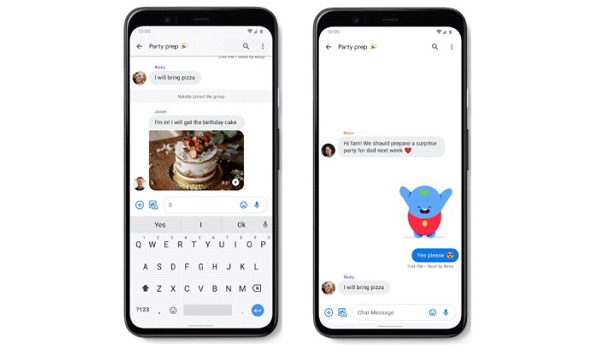
What is RCS? RCS is the new messaging standard that Google is pushing on Android smartphones. It allows you to send multimedia messages and is expected to replace SMS as the mobile communications standard. In terms of functions, it works more like instant messaging apps and services like WhatsApp, Facebook Messenger, and Apple iMessage.
RCS is more like MMS (multimedia messaging service), which has not seen much usage among consumers over the years since it was introduced. Google and network operators are hopeful that Rich Communication Services will record widespread usage.
How does RCS work?
It is difficult to explain it in on-technical terms. All that is important to know is that Rich Communication Services run directly on the network, just like voice calls and SMS do, and allow you to exchange images, audio, video and other file types along with traditional SMS. It also features group chats, and typing indicators.
Like SMS, Rich Communication Services supports the GSMA’s Universal Profile for interoperability across operator networks and devices. In simple English, it is expected to work on any mobile device and on any mobile network or carrier.
Note though that the implementation is tricky. Even if your network carrier supports Rich Communication Services, it may choose to not support the Universal Profile – meaning that chat messages from your network to tohers will not go through. Also, not every Android phone on each network will get it, because networks approve handsets one by one.
How and why is RCS better than SMS?
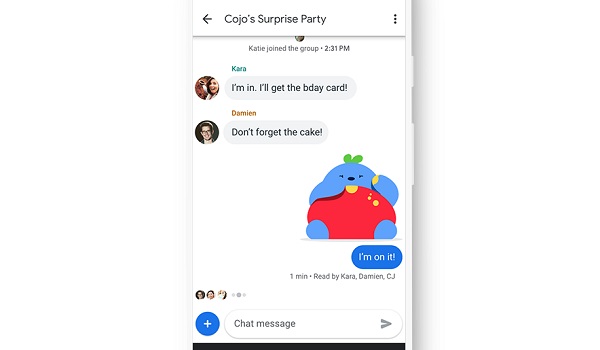
Basic SMS is dated for modern communication needs because it is limited to just text. Today, we love to communicate in more visual and richer ways – images, video, audio, PDF, and more.
Rich Communication Services makes all this possible and so is an improvement over SMS. It runs directly on the mobile network without the need for a 3rd party app (like WhatsApp, Messenger, Telegram, Skype, etc). That is one of the key attractions. Another attraction is that, unlike SMS, there is no character limit. You can type all the text that you want to without any limitations.
Lastly, businesses can also use Rich Communication Services to send tickets, boarding passes, product delivery alerts, and payment links to consumers and users, who can then act on those things without leaving the RCS client.
What phones support RCS?
Rich Communication Services is supported on Google Pixel 3, 3a, 4 and newer devices, and on most Android smartphones and tablets released since 2018. It is not supported on Apple iPhones, though Apple has announced in November 2023 that it will add RCS support to iPhones from 2024.
What carriers /operators support RCS?
All four major carriers in the United States of America – Verizon, AT&T, Sprint, and T-Mobile – have thrown their weight behind the new service. Vodafone supports the service in Albania, Czech Republic, Germany, Greece, Hungary, Ireland, Italy, Malta, New Zealand, Portugal, Romania, Spain, Turkey, and United Kingdom. Other networks in France, Italy, Spain, Portugal, Singapore, Argentina, Pakistan, Poland, and Turkey are also already rolling out the service.
Does my phone have Rich Communication Services? How do I check?
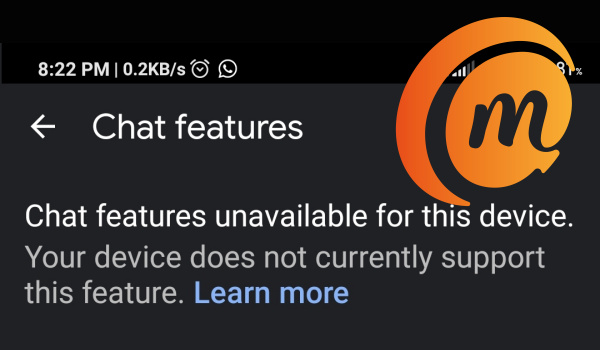
Here is how to determine if your device is using the newer Rich Communication Services messaging. Open the Messages app on your Android smartphone, select the 3 dots in the upper right side of the screen, then select “Settings”, then “General” and “Chat Features”. You will see a notice telling you whether or not Chat features are available for your device.
How do I get RCS on my phone?
- Open the Messages app on your Android phone. If you don’t have the app, you can download it for free from HERE .
- Tap the three dots in the top-right corner.
- Tap Settings .
- Tap General .
- Tap Chat features .
- If your device is supported, you will be required to enter your phone number.
- Tap Continue .
That is it: you are ready to use Rich Communication Services on your device.
How to change RCS to SMS automatically
Sometimes, when there is a network issue, your RCS message might not go through. In such situations, you can set your phone to change RCS to SMS automatically for sending. I share how to do that in this YouTube video:
How to enable RCS Chat in countries where it is not supported?
For now, there is no way to enable or activate the new messaging service in countries where it is not supported.
In summary, Rich Messaging Services is Google’s take on instant messaging and is an alternative to popular services like WhatsApp, Messenger, and iMessage. Its great advantage is that it has wide network support and is being pushed to replace SMS.
- Don’t miss our mobile phone reviews .
- Follow our news on Google News .
- Follow us on Instagram , Facebook , Twitter .
Author:InfoDesk
Add MobilityArena as a preferred source on Google
Google Duo has seen a number of updates in recent times which have all been geared towards helping users enjoy a better experience with the video conferencing app. Now, Google Duo has incorporated the invite link feature (seen in Zoom and Google Meet) which lets users invite other participants for a video call session by simply sending them a link.
This feature was implemented via a server-side update, meaning that users do not need to download or reinstall any apps. It is presently only available for the mobile app with no news yet when we would see this feature with the Web client.
This feature was first announced by Google in May as part of a larger update. This is Google’s way of making video calls easier to navigate for its users.
To get the invite link, you can create a group in the Google Duo app and the link will appear there. This link can then be shared to participants you wish to invite for the call. If the group has already been created, you can get the link by tapping on the Share icon on top. When a call is underway, clicking on the three-dot menu icon will bring up a Share option too.
This feature is currently only available for Android and iOS devices, however, a report from 9to5Google says that Chromebook users will be able to use the link to launch Duo and join a call if the Android app is available.
Last month, the video conferencing app received an update that allowed users register on Android tablets without phone numbers. It also announced that group video calls will be available for the Web version too.
References
- Source ;
- Source .
Author:Alfa Baye
Staff Writer
