Add MobilityArena as a preferred source on Google
What is SIMO Internet technology? What is SIMO used for? SIMO is a kind of virtual SIM card and so is not a physical SIM card. It is software-only – like a data eSIM, allowing you to connect you to the Internet on your smartphone, tablet, and laptop without a physical SIM card or WiFi.
How does SIMO Internet work? This virtual data technology works through an app or software, called SIMO Connect application, that you install on your device to connect you to the Internet. Again, this does not require a SIM card or WiFi. With the SIMO app installed on your Android phone, or the software installed on your laptop, you can connect to the Internet on more than 200 wireless carriers (MNOs and MVNOs) in over 130 countries and regions without a SIM card. You need a SIMO-supported or approved device to use the service.
How Does A SIM Card Internet Work?
Regular SIM card Internet, also called cellular data , requires a physical SIM card or eSIM from your carrier, which lets your iPhone, Samsung phone, or other phone connect to the mobile network of your carrier. SIMO Internet technology bypasses this system in some way. Your device still connects via a wireless network, but it is not restricted to a particular carrier.
Features Of SIMO Internet
- Carrier-free: With SIMO, you are not restricted to a particular carrier network. You can switch between phone carriers – disconnect from a network if the connection is slow and search for a better alternative.
- SIM-Free You don’t need to insert a SIM card in your smartphone to see SIMO Internet. It works with or without SIM cards.
- Roaming Free: You pay a low rate for data no matter where you go. You are free from surprise roaming charges or expensive international phone plans.
How To Use SIMO App
- Enable your phone Wi-Fi connection.
- Launch the SIMO app on your Android phone or tablet
- Sign-up using your phone number, email address or social media handles like Facebook or Twitter.
- After successful login, turn off your WiFi and click the ‘Connect’ button in SIMO app homepage to connect to the Internet.
- You are automatically redirected to the SIMO storefront page to purchase a new data subscription from those available in your country.
- You can also renew your subscription whenever you are almost out of data.
How to get SIMO Internet
- Choose a device from SIMO to access mobile internet without the need of a SIM Card
- Pick the data plan that works best for you — by the hour, by the GB or by the month! No contracts, switch data plan anytime.
- Enjoy fast internet connectivity anytime, anywhere with SIMO devices and services!
What Phones Support SIMO Internet In The USA?
BLU Phones is an official partner to SIMO here in the United States. If you want to give SIMO a try here, you should look to get a BLU smartphone. Hopefully, more brands will become available.
Where Can You Get SIMO Internet In The United States?
SIMO’s carrier partners in the USA are T-Mobile, and AT&T. You can also get service through BestBuy, Walmart, and Target.
Where Can You Get SIMO Internet In Canada?
Rogers Wireless in Canada is a partner to SIMO.
Where Can You Get SIMO Internet In Mexico?
In Mexico, SIMO is in partnership with Telcel.
In Summary
SIMO Internet allows you to connect to the Internet with or without a SIM card in your device, without limiting you to a particular carrier. It works when travelling, so you can avoid expensive cellular data roaming fees. It also works on tablets and laptops as well, for connecting to the Internet. All that is required is that the SIMO Connect application be installed on the device.
You can use SIMO Internet when travelling in over 130 countries in North America, South America, Europe, South Pacific, Middle East, Asia, and Africa.
Author:MobileChic
That motivated, gadget-loving geeky chic who tries to stay on top of things. Unapologetic iFan.
Add MobilityArena as a preferred source on Google
Nowadays, more people watch movies and TV shows on streaming services like Netflix and Hulu. If you have a subscription and don’t need to be offline, this is a great option.
If you want to download movies for free on Android smartphones to watch later, you might consider switching from a streaming service to one of the following Android apps.
- YouTube
- KFlix
- Tubi
- Cinema HD
- Free HD Movies
- Vudu
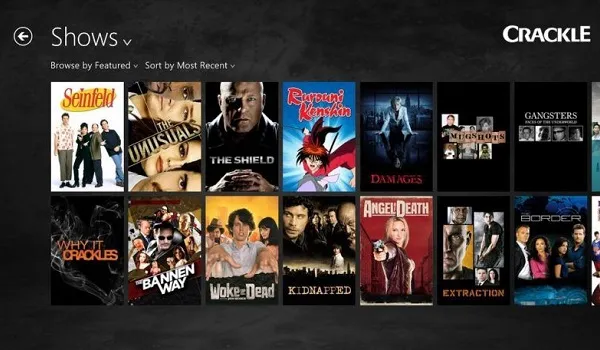
- Crackle
- VidMate
1. YouTube
Best for using your smartphone to watch old movies. YouTube is one of the software that comes pre-installed on your Android device, so you won’t need to download and install any additional software to begin watching movies.
YouTube has a fantastic selection of films. The majority of these, however, are old films published to YouTube by production firms and films by indie filmmakers who upload their content to their own YouTube channels.
If you like movies that aren’t aimed at a broad audience, YouTube is a terrific place to start. While you may discover the most recent movies on YouTube, you must pay a rental fee to watch or download them. It is by far the most popular app you can use to download movies for free on Android devices.
2. KFlix
3. Tubi
Users who wish to watch movies and TV shows that aren’t offered on Netflix should use this service. Have you ever searched Netflix for a certain movie only to be disappointed when it wasn’t there? You can download movies for free on Android smartphones with Tubi, which has a section just for stuff that isn’t on Netflix.
4. Cinema HD
Although the movie is available in Cinema HD in HD quality, you can download it in whichever resolution you wish. There are also a lot of subtitled foreign language movies accessible. The primary drawback is that you might need to manually download the APK file and install Cinema HD on your smartphone because it isn’t always available for download through the Play Store.
5. Free HD Movies
Best for: A vast range of titles, and the app works reasonably well. This program contains a good selection of new and older movies, and the quality is excellent. You’ll also notice that the app has a lot of positive feedback, which is uncommon among free movie-watching apps on the Google Play market.
Importantly, you can save any of the videos to your smartphone and watch them later. There’s also a useful search option to help you find movies to watch. Almost all of the content on Free HD Movies is in HD resolution and features subtitles in a variety of languages.
6. Vudu
Best for: Streaming 5k resolution movies. You may stream and download movies for free on Android devices using the free Vudu app. You can download a lot of the movies and TV series from it to watch later on your Android device or watch them online. The software is free to download and use, but before you can download any content, you must first watch a few adverts.
But the video and audio quality that Vudu offers makes it all worthwhile. The nicest feature of this software is the chance to view your favorite movies in breathtaking 4K UHD. It offers Dolby Vision HDR sound quality as well, so you can watch television with ease.
7. Crackle
Crackle is another good alternative for movie downloaders. All of the usual features are present, such as a user-friendly interface, a straightforward search tool, and a vast collection of free movies and TV shows to watch. Because the program is free to use, some advertising appears, but it is not intrusive in any way.
If you log in, the app will ask you a few questions before providing you with a list of personalised movie recommendations if you’re not sure what to watch next. Crackle also offers quick streaming and downloading speeds. This software may be great for you if you detest or cannot afford to spend time.
8. VidMate
You may view and download movies for free on VidMate, where you can find both new and classic titles. Regarding this app, bear the following in mind: Your location affects the title choices, and VidMate isn’t offered in the Google Play Store. As a result, you must first download the APK file from the website before you can use the service.
Integration with additional platforms like Soundcloud, YouTube, Vimeo, Dailymotion, and Instagram is great. VidMate stands out from the other apps on our list since it lets you watch and download content from other websites including YouTube, Vimeo, Dailymotion, Instagram, and SoundCloud.
Author:Moses Udah
Creative, teacher, web content writer, copywriter, and student.
