Add MobilityArena as a preferred source on Google
Recently Whatsapp has been adding new and improved features to it’s application both on Android and iOS, the feature to be added this time might be one that most uses have always wanted.
Currently, the only way to record and send a voicenote on WhatsApp is to either hold the microphone icon for the period you are speaking then release the icon when you are done speaking to send, or swipe up from the microphone icon to lock it while you speak and then hit the send button when your done speaking.

For either of the methods mentioned there is no room to accommodate possible distractions, if you encounter any form of distraction you just need to cancel the entire voicenote and start recording all over again.
WhatsApp is making plans towards bringing that to an end by adding a pause button to the voicenote feature. With this you can accommodate any distraction by pausing your recording and attending to whatever the distraction might be, then returning to your recording.
This feature will be a very important addition to WhatsApp and will be welcomed by so many users out there. The pause button might find its way to WhatsApp via a future update.
Source
Source
Author:KittysTech
Tech analyst, Collins Eshiet, writes about technology. Follow me on Twitter @KittysTech.
Add MobilityArena as a preferred source on Google
Twitter has been working on this feature for quite a while now and finally it is here for all web clients. What does this feature do?
Sometimes it might be rude to outrightly block your follower on Twitter or any other social media platform, well “remove this follower” solves that problem.
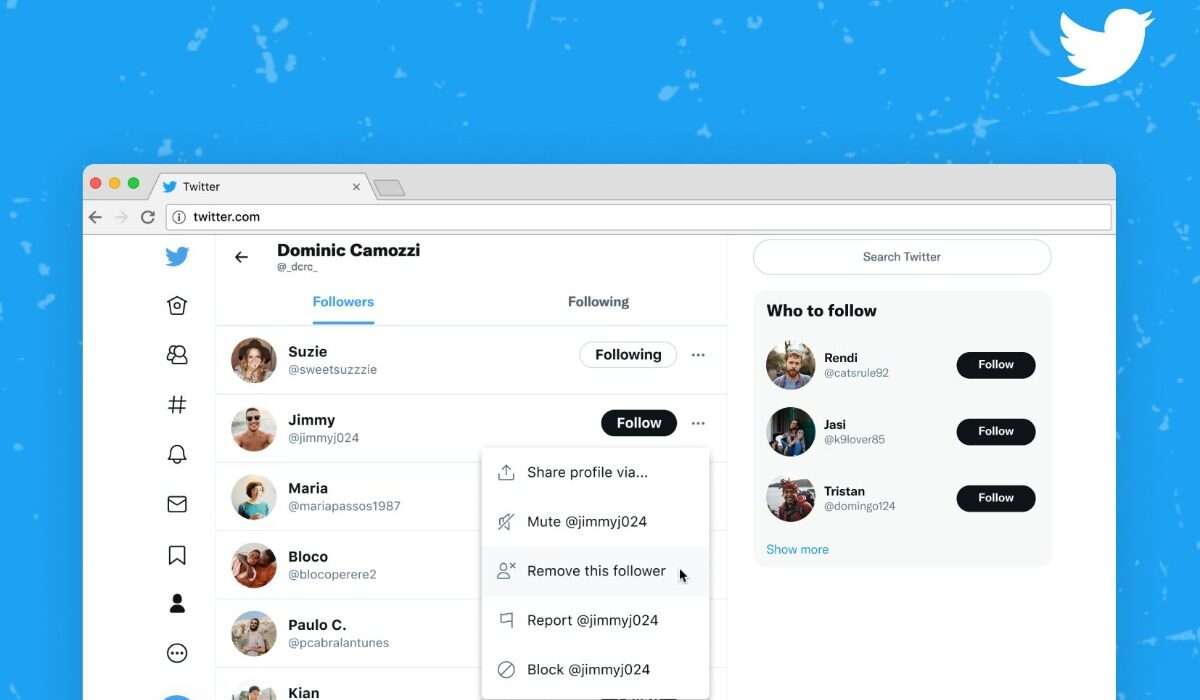
Instead of blocking a follow that might have annoyed you just head over to your follower section on Twitter (web) and tap on the three dots next to the follow button then select “remove this follower”.
After you must have followed the steps above Twitter will in turn remove the individual from your follower list without notifying the person thereby keeping it private. This action does not entirely stop the person from following you as they can later on follow your Twitter page again, but it certainly gives you a good level of control over who follows you.
For now, this feature is only available on Twitter for web clients though it may find its way to the Twitter mobile application sooner than later. So if you are a Twitter mobile user and want to try out the remove this follower feature simply login to your Twitter account on a web browser like Chrome or Safari.
- Source
- Source
Author:KittysTech
Tech analyst, Collins Eshiet, writes about technology. Follow me on Twitter @KittysTech.
