Add MobilityArena as a preferred source on Google
In 2022, the Android operating system now powers a little over 70% of the total smartphones in the world. When was Android invented or launched? On the 5th of November 2007, Andy Rubin unveiled the all-new Android operating system to the world. Development work had been ongoing since 2003, however. The first Android phone, the HTC Dream , which I got to own, was released almost a year later in September 2008.
The operating system was designed from the ground up to allow developers build apps for use on it, similar to the way software programmes run on personal computers. At the time of initial release, while far from beautiful, the Android operating system was a breath of fresh air in the world of mobile phones. The user interface has since undergone several iterations. Android 12 , released in 2021, was groundbreaking as far as Android’s user interface is concerned.
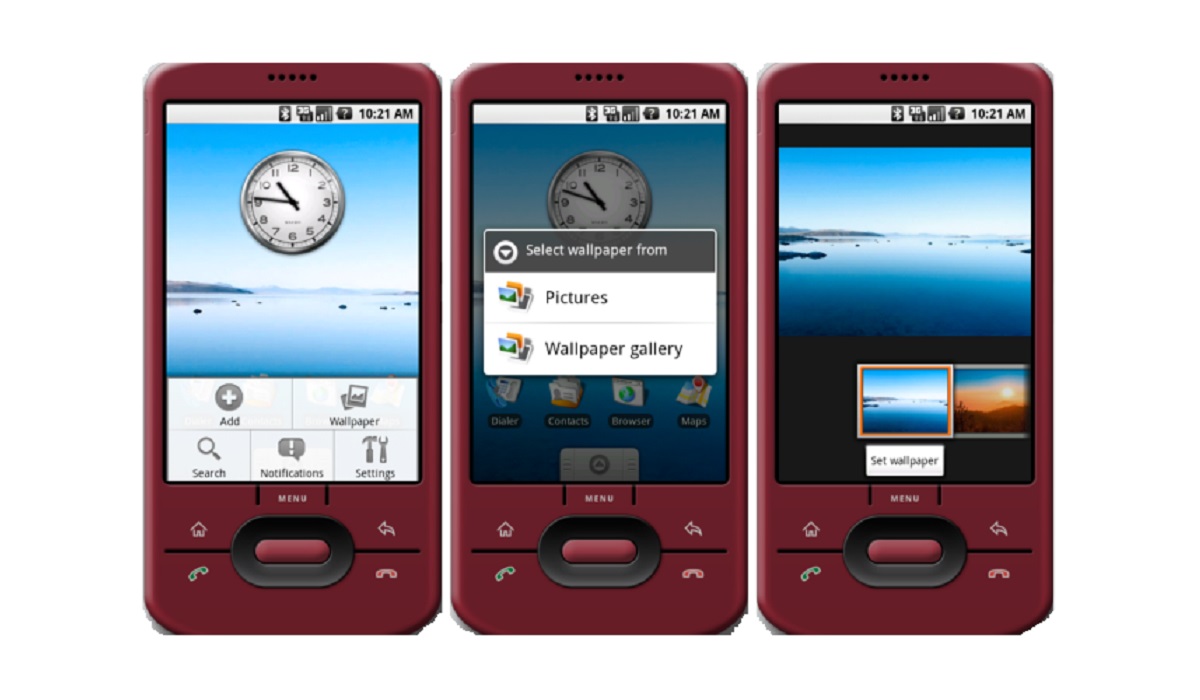
This was what Android OS looked like when it was invented or launched..Source.
When was Android invented? Watch the Announcement Video
Android OS went on to become the best-selling mobile OS worldwide since 2011 and on tablets since 2013. It is used in phones and tablets made by every mainstream mobile phone manufacturer except Apple which uses iOS. iOS and the first iPhone had been around since June 2007, but being restricted to use by only Apple meant that it never stood a chance against Android in terms of numbers.
Author:Mister Mobility
Digital Skills and Communication Coach | Mobile Phone Connoisseur since 2001 | Tech Blogging since 2004
Add MobilityArena as a preferred source on Google
Why would you need to Change country on a Samsung phone? Our location typically determines most of all of the services we can access online through our mobile devices. Service providers are required to filter out inappropriate content and only show us non-conflicting stuff while abiding by local laws and regulations.
If you frequently travel or you’ve bought a Samsung smartphone from a country where you don’t plan to stay permanently, you might experience some difficulties when attempting to access some necessary services. Thankfully, you can fix this by being familiar with a few simple adjustments that will enable you to quickly change your location on your Samsung device.
Why would you need to Change country on a Samsung phone?
We’ll show you the necessary steps to take in this guide so that you can conveniently change the location on your Samsung smartphone.
How Do I Change Country on a Samsung Phone?
You’ll need to set your region to the one you’re at right now to get the most out of Galaxy Stores, Samsung Members, as well as other Samsung applications. You should change your device’s region to the US to get the most out of it, for instance, if you live in the US but purchased the phone from Germany.
Unfortunately, there isn’t a switch in the software to speed up the procedure, so you’d have to perform it by hand. Note before moving forward that you’ll need to back up your data, so don’t forget that.
Follow these steps:
- You’ll need to enter a local SIM card, reset your Samsung device, and change your region.
- After obtaining and inserting a local SIM card, go to Settings , “General management,” and tap on “Reset.”
- Next, select “Factory data reset,” and then press “Confirm.”
The default country (of purchase) settings or the SIM card settings (for the country you’re in) should be available for loading after the phone has started. Select the latter, and all of your Samsung apps should now adhere to the laws of your current country location.
How Do I Change the Location Settings for Google Play Store?
Most of us get the majority of our apps from the Google Play Store, thus we’ll always need to switch the region whenever we travel. Google apps don’t require you to switch SIM cards in order to switch regions, unlike Samsung apps.
You would be set to go if you added a new payment method and verified your address. It’s important to note that Google Play only allows you to change your location in settings once every twelve months. Google requires that you reside in the new region or country in order to change your region or country, as well as to add a payment method from the new country.
- First, visit the Google Play Store, select “Payment methods” from the hamburger menu in the top-left corner, and then enter a new payment method.
- Disable the cards from your old country by going to “More payments settings.”
- To add a new payment method, scroll to the bottom of the screen after removing the cards.
- Click “Save” after entering your card information. Within 24 hours, Google should have altered your country accordingly.
If you already have several Google Play payment profiles, switching between them would not be too difficult. Note that after changing your region, you cannot change it back or to a different region for a full year. Therefore, be careful to change only when it is absolutely necessary.
Follow these steps to get it done:
- Start the Google Play Store app, select the hamburger menu in the top-left corner, then select “Account” to change your region.
- You ought to view the nations and profiles you’ve so far added under “Country and profiles.” Choose one to make it your default country.
It’s that easy! Just make sure to follow the instructions above carefully.
In summary , if you ever move from one location to another and need to change country on your Samsung phone, or change the location settings of Google Play Store, the instructions we’ve provided in this guide should help you do it easily. Remember to change these settings carefully and not do so without needing to since you can only change them once a year.
