Add MobilityArena as a preferred source on Google
Mobile phones have been one of the greatest inventions of the 21 st century. It helped us break free from the shackles of desk phones, which tied us to one location. The advent of mobile phones redefined what we could do with this calling machine.
But with one problem solved, another problem surfaces. Because the device is mobile, it is prone to a lot of exposures which are not favourable for the device. One of such conditions is the device falling into water. It could be a small puddle, a water closet, a stream, or even a river. Water is the enemy of any electrical board, and it causes serious damage to any device it comes in contact with.
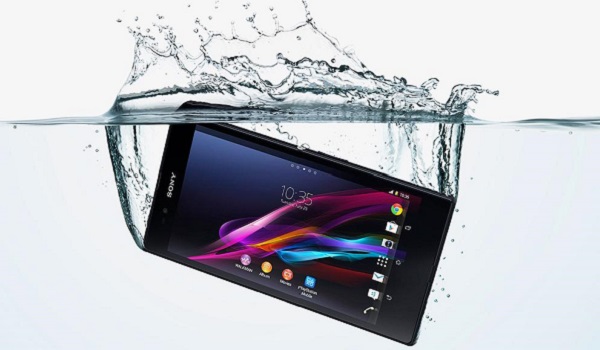
Now, there are a lot of articles already writing on what to do when your device falls into water, and each one proffering a different solution. But the irony of it all is, people now know what to do, but don’t know what NOT to do. So, this article is going to be talking about what NOT to do when your device drops into water:
When Your Phone Drops In Water, Do Not Put It On
Just like when your tire burst on top speed, the first instinct you get is to step on the brakes, and this could prove fatal. So also, when your device falls into water, the first thing you want to do is put it on the back to check if it is still working. DO NOT put it on, or try to put it on. If it is still on, remove the battery. If it comes with a non-removable battery, press and hold down the power button. Whatever step you want to take thereafter, it can be done with the device off.
When Your Phone Drops In Water, Do Not Swing Dry It
This is also something we all want to do. We feel by swinging it, it would drain the fluid inside. This is partially true. The truth is, swinging it would expel water from one side and allow more entry on the other side. You could place the device vertically, but DO NOT swing dry it.
When Your Phone Drops In Water, Do Not Apply Direct Heat
Now that your device is wet, everything you do on it have to come to a halt. All chats suspended, calls etc. You practically become useless. This can make you want to make haste with the drying process. You would want to be done with the process in a jiffy. This might push you to increase the heat of the dryer/heater used to dry the device. Excess heat can damage the board or the body of the device if it is made of plastic. It could also affect the screen of the device. DO NOT apply direct heat. Do not apply too much heat.
When Your Phone Drops In Water, Do Not Blow Dry It
This is another funny action people do when their device falls into water. They either use a blower or use their mouth to blow air into any available vent on the device. They hope this would dry the device. On the contrary, this would push the liquid further into the device. So DO NOT blow air into the device, either manually or with a blower.
When Your Phone Drops In Water, Do Not Plug It To Power
This is also another thing people like to do. Because they want to know if the device is still working, they tend to plug it to a main source. This could lead to the complete frying of the board…instantly. DO NOT plug it to power, instead, find every means possible to make sure it remains off during the entire rescue process.
- Don’t miss our reviews .
- Follow our news on Google News .
- Join our WhatsApp Group , to be notified of the most important articles and deals,
- Follow us on Instagram , Facebook , Twitter , and YouTube .
Author:Kaykerry
Winto Online Casino Winto Online Lottery Winto Online poker Winto casino Winto Lottery Winto Poker Join Winto Join to Winto Winto Jackpot Winto Online Gaming Winto Online Gaming Winto Online Gaming winto sbobet winto sportbook winto slot winto pg soft winto pragmatic play winto saba sports winto pussy88 Winto Live Score Winto News Winto Slot Demo Winto 4D Live Draw Winto Live Draw Winto HK Lotto Winto Singapore 4D
Add MobilityArena as a preferred source on Google
Android 7.0 Nougat was a big leap for the Android series and it came packed with a lot of new features that helped the Operating system as fluid and seamless as possible. Part of the additions to the Operating System functions is the ability to divide the screen of your device into two equal halves and run two apps simultaneously.
Imagine you are running a bank app, and you use one of these budget devices that is poor at multitasking. You get to a point and you are required to input your OTP and the moment you leave the bank app to your SMS inbox, the bank app closes and you have to start all over again. Imagine the frustration. The Split screen function is also one of the most underrated functions on Android phones running Nougat and newer.
This function is also present on the latest Android 8.0 Oreo and newer versions of the Android operating system, but in a much more improved version. I recently met a friend and we were discussing and I talked about the split screen, and to my amazement, he couldn’t activate it. This prompted me to do an article on it.
Some Android phone makers have implemented it in their devices through their custom UI (user interface), but some others have not. If your Android phone does not have split screen function activated, you will have to do it yourself.
How to activate split screen function on your Android phone
Activating a split screen on an Android device running on Android 7.0 and above is a piece of cake if you know how to go about it, but an uphill task if you are a novice in that field. Here are some easy steps to activate and enjoy the function.
Step 1: First you need to activate the developer mode. This is not really compulsory, but it would help you force some apps that were not designed to work with the split screen function to work by force. To do this go to Settings > About this device > Build number. Once you are there, click on Build number a few times until you get a notice saying you are now a developer.
Step 2: Once in the developer mode, scroll down to the end of the page and enable the option that says “Force activities to be resizable”. Once you do this, restart your device to activate the option. Once you have restarted your device, even those apps that aren’t usually compatible with the split screen option will be able to run in split-screen mode.
Step 3: Click on the recent button and click and hold any open app, then drag it to the upper part of the screen. Once you do that, you would see the screen has been divided into two.
- Don’t miss our reviews .
- Join our WhatsApp Group , to be notified of the most important articles and deals,
- Follow us on Instagram , Facebook , Twitter , and YouTube .
Author:Kaykerry
Winto Online Casino Winto Online Lottery Winto Online poker Winto casino Winto Lottery Winto Poker Join Winto Join to Winto Winto Jackpot Winto Online Gaming Winto Online Gaming Winto Online Gaming winto sbobet winto sportbook winto slot winto pg soft winto pragmatic play winto saba sports winto pussy88 Winto Live Score Winto News Winto Slot Demo Winto 4D Live Draw Winto Live Draw Winto HK Lotto Winto Singapore 4D
