Add MobilityArena as a preferred source on Google
In past years, Nokia had positioned itself as the champion of speedy Android updates, thanks to its commitment to Google’s Android One programme. But we are seeing Samsung run rings round them with Android 11 updates. The Android One project is designed to produce smartphones that run stock/pure Android and that receive speedy software updates similar to what Google Pixel phones get.
While Nokia adopted and ran with the Android One vision, software updates to their smartphones have been anything but speedy. Still, they got it done better than other brands. Last year, OnePlus gave a good showing of itself and pushed out Android updates to its phones quite fast. We were expecting a showdown between Nokia and OnePlus this year. We were wrong.
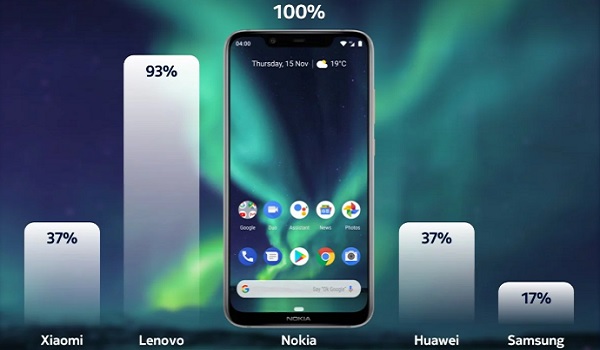
Samsung has taken the winds out of the sails of both Nokia and OnePlus and have successfully updated a long list of their phone models to Android 11 in the last few months. As a matter of fact, Samsung have made Nokia and OnePlus look really bad this time around.
- Samsung Phones That Have Received Android 11 Update
- Samsung’s Android 13 Update Rollout
Samsung Phones That Have Received Android 11 Update
Here is a list of Samsung phones that have been updated to Android 11 till date.
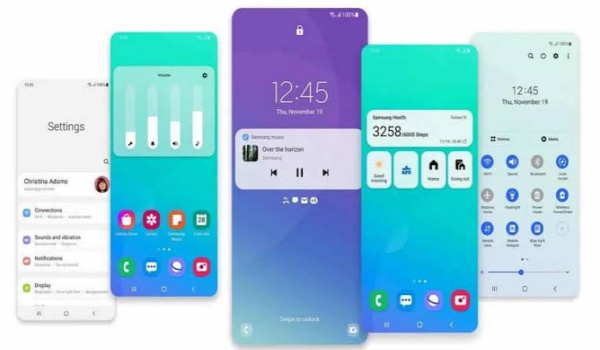
Note that for Samsung phones, the Android 11 update comes packaged with version 3.1 of the company’s custom Android skin, One UI. As such, all these phones now run One UI 3.1.
- Samsung Galaxy S20
- Samsung Galaxy S20 Plus
- Samsung Galaxy S20 Ultra
- Samsung Galaxy Note20
- Samsung Galaxy Note20 Ultra
- Samsung Galaxy Z Fold2
- Samsung Galaxy Z Flip
- Samsung Galaxy S10
- Samsung Galaxy S10 Plus
- Samsung Galaxy S10e
- Samsung Galaxy Note10
- Samsung Galaxy Fold
- Samsung Galaxy A71
- Samsung Galaxy A51
- Samsung Galaxy A90
- Samsung Galaxy A80
- Samsung Galaxy A70
- Samsung Galaxy A50
- Samsung Galaxy F41
- Samsung Galaxy M31
- SamsungGalaxy M51
- Samsung Galaxy Tab S6
- Samsung Galaxy A51 5G
- Samsung Galaxy A71 5G
- Samsung Galaxy M31
- SamsungGalaxy S10 Lite
- Samsung Galaxy S20 FE
That makes at least 27 Samsung phone models that have been treated to the Android 11 update.
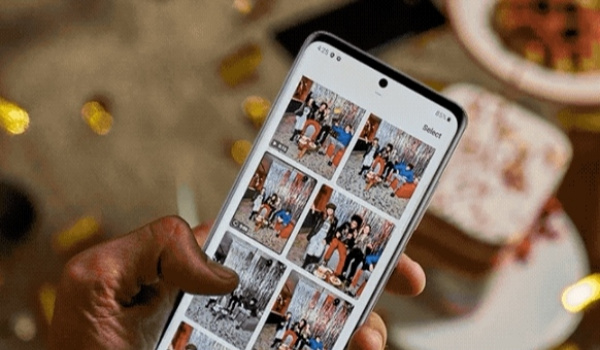
More and more Samsung smartphones are being updated to Android 11 day after day. It is such a marvellous sight to see.
Meanwhile, the only Nokia smartphone that has been updated to Android 11 is the Nokia 8.3 5G. That’s it. And it only just got updated in February 2021. On the 4th of February, HMD Global’s Chief Product Office tweeted that updates to other Nokia phones would follow “fast”. His exact words:
Counterpoint Research recognized us for fastest portfolio wide deployment of Android 9 & 10. Now we do a hat trick with Android 11 committing to latest Android experience even to our most affordable global handsets . Nokia 8.3 5G opens flood gates, other products to fast follow.
Here we are over a month after that tweet, and nothing has happened yet. So much for fast. One has to ask, What is happening at HMD Global? The promise of fast updates was why I said in 2019 that my next smartphone might be a Pixel or a Nokia . In September 2020, HMD published an Android 11 update calendar for Nokia phones but quickly withdrew it, and it has been mostly silence from them since then. Strange.
Just last year, OnePlus was impressive with Android 10 updates . One only wonders why they are sleeping on Android 11 updates this time. Only OnePlus 8 and 8 Pro have been updated as at the time of writing this article. None of OnePlus 7, 7 Pro, 7T, and 7T Pro have received Android 11 as at February 2021. So far, it looks like when it comes to Android software updates, with the exception of Google, past performance is no indicator of future results.
Recently, Samsung committed to providing 3 years of software updates to its Galaxy S flagships, high-end Galaxy A phones, and Galaxy Z foldable devices. That is similar to what HMD Global promised for all Nokia phones.
Having vouched for Nokia and OnePlus in the past and having been left with a sour taste in the mouth, I am not vouching for any brand but Google going forward. I might change my mind and vouch for Samsung if they keep up this sterling performance for 3 consecutive years.
For now, if you want the speediest Android software updates, I recommend that you buy a Google Pixel. With the other brands, I will be cautious and say that for now, there are no guarantees. Who knows – when Android 12 arrives, TECNO might be the brand to deliver the speediest software updates while Samsung goes back to sleep again. At this rate, anything is possible.
Meanwhile, this unfolding Android 11 update drama reinforces something I said last year: Android One needs to die and go away . It has outlived its usefulness. Selah.
Samsung’s Android 13 Update Rollout
2022 Update : Almost two years after this article was first published, and Samsung has kept its promise of delivering Android updates. As a matter of fact, several Samsung galaxy phones have received One UI 5.0 based on Android 13, at the time of updating this article. The Korean brand has been on a blitz of updating their existing (and often years old) cell phones and tablets to Android 13.
Copyright Notice : Reproduction of this article on any website, eBook, book, newspaper, magazine or other media without express written permission from MobilityArena is a violation of copyright rules and will result in appropriate action being taken against violators.
Author:Mister Mobility
Digital Skills and Communication Coach | Mobile Phone Connoisseur since 2001 | Tech Blogging since 2004
Add MobilityArena as a preferred source on Google
I have been using the UMIDIGI A5 Pro for a little over 7 months now, and for the price, it offers awesome value for the money money. I had shared my experience with it five months ago. Recently a problem showed up that made me consider replacing it with a phone from a different brand, like Redmi.
Since buying this phone, it has received two OTA updates till date. I had already installed the latest of these updates before reading online that there are many bugs in it and people should not update. Too late; I was stuck with bugs and no other update in sight for months.
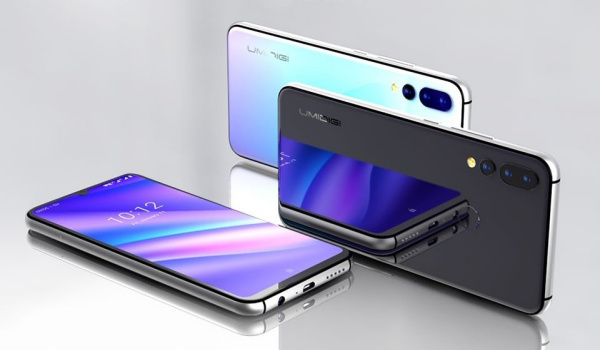
For a while, I didn’t notice anything amiss in the operations of the phone. But eventually, I got bitten by one.
- UMIDIGI A5 Pro Multitasking Problem Shows Up
- Fix for the UMIDIGI A5 Pro Multitasking Problem
UMIDIGI A5 Pro Multitasking Problem Shows Up
Recently, something had been bothering me about the phone.. to the extent that I was actually considering selling it and getting a different brand. The A5 Pro smartphone packs 3 GB of RAM and runs almost stock Android 9 Pie. Performance should not be an issue; right?
Now, however, when I switch from one app to another and then attempt to switch back to the former application, or even any from the Recents List, I discovered that the original application is reloaded afresh. Apparently, it got shut down within such a short period of time.
The implication of this is quite significant if you have to multitask on your smartphone. Let me paint a scenario. Supposing you have to credit about five people with funds. You have your digital banking app open, and you’re on the right page to make those transfers.
You then switch to your Whatsapp to pick an account number from a an existing conversation, or you launch your calculator app to calculate something quickly, or you load your spreadsheet app to check some other information.
You then switch back to your banking application and find that the app refreshes and you are having to log in afresh! Or, you have been composing a fairly lengthy article (like this one), you get interrupted by an urgent email, which you quickly answer, and then switch back to the document you have been composing, only to find the note app is reloaded, obliterating everything you have been typing for fifteen hours.
Clearly, this would cramp anybody’s productivity. Those were the kind of scenarios I was facing. So, I dived into the phone Settings, meticulously looking for what could rectify this undesirable behaviour. I searched and searched and tweaked everything that remotely sounds like it had a connection to the problem, but the behavior persisted.
To make matters worse, there was some added mystification in that the behaviour is not consistent. It happens sometimes; some other time, apps don’t reload. For a 3 GB RAM smartphone with only essential apps installed, a paucity of RAM surely couldn’t be the problem..especialy, since this was not happening originally. Surely, it has to do with memory management, with a view to conserve battery.
So, I went on tweaking battery optimization settings unendingly.. and the situation persisted… albeit randomly.
Fix for the UMIDIGI A5 Pro Multitasking Problem
I was already contemplating getting a Redmi 9C until I happened on the solution, by accident.
There is a little option under Settings called DuraSpeed. This is the key to solving the problem. Why anybody would give such an unimaginative name to something so critical is beyond.me.
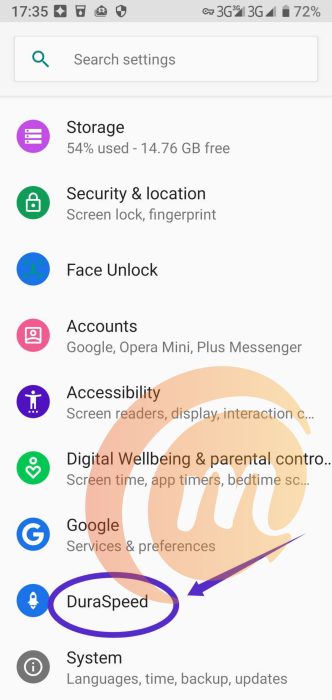
Here is what to do:
- Open the UMIDIGI A5 Pro phone Settings
- Find DuraSpeed in there
- Ensure DuraSpeed is ticked on.
- Select all the apps listed and tick the check boxes ON.
- Next, tick off apps that you would not mind if they get reloaded when you switch back to them.
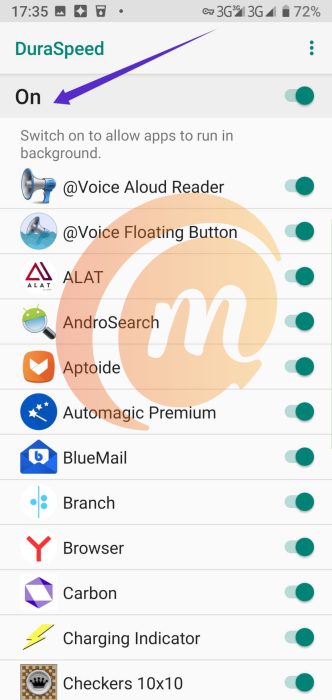
After you have done the above, reboot the phone. You would find that the selected apps don’t reload anymore when you switch away and back, and are no longer crippling your style. And the world is at peace again.
Before discovering the solution, I woild not have dared to leave this long document unsaved and switch to another app. But, while composing this article, I have switched multiple times, and the editor didn’t get reloaded, wasting my minutes of effort.
I imagine that this solution will also work for any other UMIDIGI phones experiencing the same problem with switching between apps. If you own a UMIDIGI device with similar behaviour, you now know how to fix the problem. Use DuraSpeed.
Copyright Notice : Reproduction of this article on any website, eBook, book, newspaper, magazine or other media without express written permission from MobilityArena is a violation of copyright rules and will result in appropriate action being taken against violators.
