Add MobilityArena as a preferred source on Google
There is always someone trying to snoop around and invade your privacy. What can you do to see who tried to unlock your phone in your absence?
Even though you’ve activated a screen lock on our mobile device, there’s still someone who’ll try to gain access to it. If you are worried that there’s someone attempting to get into your phone, or you just want to have a piece of picture evidence in case someone steals your phone, this article is for you.
Can you tell if someone tried to unlock your phone? Yes; you can. But can you see who tried to unlock your phone? Yes; you can. Is there an app, or are there apps, that can take pictures of someone trying to unlock your phone? Yes; there are, and we’ve listed the best ones that can help you with it.
Intruder alert – The following apps will let you see who tried to unlock your phone
All these Android applications make use of your front-facing camera for taking photos of anyone anytime they type the wrong password on your phone. Let us check out how these apps can help you in catching trespassers in the act.
Prior to you installing any of these applications, you should be aware of some points that are common to them all.
Initially, they can not take pictures of anyone attempting to unlock your phone using fingerprints. The Android system doesn’t give applications the chance to see if there was a successful fingerprint unlock or not. Thereby, these applications can only be used to catch incorrect patterns, passwords, and PINs.
You should also be aware that Android considers an unlock attempt as incorrect only when the user enters 4 or more pattern dots/characters/digits. Thereby, these applications won’t take note of short mistakes. In addition, you need to set these applications as device administrators.
This is a type of Android permission that makes these apps able to monitor attempts on your lock screen. As soon as this is enabled, your Android will display a message which says that these applications have the ability to factor reset your device if the wrong attempts are too much. Nevertheless, the warning is just a generic one, as none of these applications stated will ever factory reset your device.
To set these applications as a device admin, navigate to Settings > Security & Location > Advanced > Device admin applications , then enable or disable the app you choose.
Lastly, you’re required to remove the device administration permission from any application prior to you uninstalling it. Go to the menu, as stated above, in order for you to do this. If you attempt to uninstall a device administration application via the normal method, it will not work.
- Lockwatch
- Third Eye
- CrookCatcher
1. Lockwatch
see who tried to unlock your phone with Lockwatch
The first app on our list is Lockwatch, and it is a fan-favorite application in this category. It is a seamless solution that is straightforward to use; simply enable the app, and you will receive an email anytime someone attempts to get into your phone rght after taking a photo of them.
To begin making use of Lockwatch, open the application, then enable the Send alert email slider. This application will notify you to set it as a device admin, as stated above. Ensure you have a present email address in the “Email should be sent to” field.
After doing that, set the Number of Unlock Attempts; you can pick between 1, 2, or 3 incorrect unlock attempts needed prior to them sending the email to you. It would be preferred if you set this to 2 in order for you not to get false positive emails anytime that you’re the one who mistyped your password. Nevertheless, Lockwatch won’t send an email to you if you input the right password within ten seconds of the error.
Anytime someone is caught by Lockwatch; the app will send an email to you, which includes the photograph it took, your phone’s GPS locations, and the area’s map. Hopefully, you can make use of this to track down your mobile device, or to just be aware of the person attempting to get into your device.
There are the premium features of Lockwatch in another tab. When you pay their one-time premium fee of $4, you will always get notified if someone changed your SIM cards or someone turns off your device before unlocking it. You will also get 3 pictures instead of 1, including a sound clip, in the email you receive.
In all, this is a great app that helps you see who tried to unlock your phone.
Download from Play Store
2. Third Eye
see who tried to unlock your phone with Third Eye
Another app to see who tried to unlock your phone is Third Eye. This time however, the picture of the trespasser is sent directly to your phone instead of your email. After you’ve installed the app, you will be required to give the app device admin permission in order for it to work well.
From there, you will see an easy to navigate main menu. Ensure you enable intruder detection, and the application will take a photograph anytime a person tries to get in. You can choose the number of unlock attempts between one and five. Quite different from Lockwatch, Third Eye will take a photo even if you input the right password within some seconds.
This application also gives you some extra info. The Last Unlock Time makes you aware of the last time you used your phone, and the Unlock log gives you a timeline of when your device unlocked. Go to the Photo Log tab to check out who tried to get into your phone.
Click on the three-dot menu button, then select Settings to tweak some options. You can simply change the destination of the photo, then block the pictures from showing in your Gallery. In the settings, you can also toggle the notifications of the Third Eye. A default setting makes it tell you the last time you unlocked your phone anytime you open it, which is a little bit tiring.
Third Eye is great for individuals who want to get hold of friends who trespass, but having the pictures on your device would not help in catching someone who stole your phone.
Download from Play Store
3. CrookCatcher
see who tried to unlock your phone with CrookCatcher
One other great choice to help you see who tried to unlock your phone is the CrookCatcher app, which makes use of an attractive dark theme that has green accents. You’ll be provided with a guided setup, which will show you how to set the app as a device admin and granting all necessary permissions.
To adjust options, make use of the Settings tab on the left. You’ll be able to set Attempts limits between 1 and 5. Unlike Lockwatch again, CrookCatcher will activate even if the correct password is entered within some seconds after you made a mistake. Below this, you can toggle device and email notifications, alter options for location and taking the picture, and display alert message anytime CrookCatcker takes a photo.
In general, CrookCatcher is an excellent free option to help you see who tried to unlock your phone, but it will be better if you upgrade. The options of getting both device and email notifications are great.
Download from Play Store
- Don’t miss our reviews .
- Follow our news on Google News .
- Join our WhatsApp Group , to be notified of the most important articles and deals,
- Follow us on Instagram , Facebook , Twitter , and YouTube .
Author:Victor Ehijiator
Add MobilityArena as a preferred source on Google
EVleaks has treated us to the first images of an upcoming Nokia Android smartphone codenamed Nokia Captian America. This is supposedly the Nokia 5.2 and should debut at Mobile World Congress later this month.
The mid-range smartphone features a circular quad camera setup at the back, 6GB of RAM, and 64GB internal storage. If history is anything to go by, there is likely to be a 4GB RAM variant as well. The images below show a keen resemplance to the design style of the Nokia 6.2 and Nokia 7.2 .
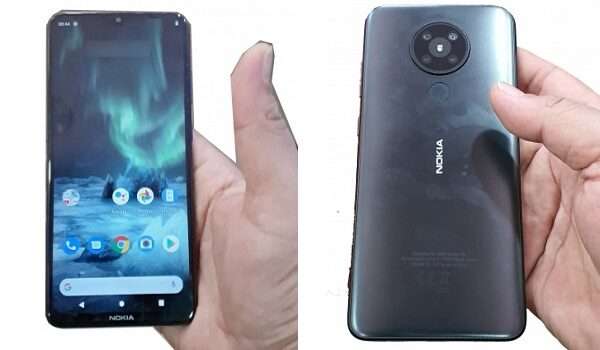
Nokia 5.2 / Captain America Quick Specs
- Waterdrop notch IPS LCD display
- Quad camera + LED flash
- Rear-mounted fingerprint scanner
- 6GB RAM
- 64GB internal storage
- Expected Price: $180 (about ₦65,000)
- Exp[ected Announcement: February 2rd, 2020
- Release Date: March 4th, 2020.
References
EVleaks: Link .
Author:MobileChic
That motivated, gadget-loving geeky chic who tries to stay on top of things. Unapologetic iFan.
