Add MobilityArena as a preferred source on Google
One careless action is enough to ruin the battery in your smartphone forever. Read and remember why your phone discharges quickly and what it is better to never do with your device.
Even the most expensive and high-quality smartphone at some point begins to charge more slowly and does not hold a charge well. No matter how carefully you use your phone, the battery has a limited service life that is almost impossible to influence. However, sometimes your phone may begin to discharge quickly not because of old age, but for completely different reasons.
- Why Does the Phone Discharge Quickly: The Main Reasons
- Old Battery
- Vibration and Constantly Running Communication Modules Ways to solve the problem:
- Extra Functions Ways to solve the problem:
- Too Many Notifications Ways to solve the problem:
- Background Applications Ways to solve the problem:
- Location Tracking Ways to solve the problem:
Why Does the Phone Discharge Quickly: The Main Reasons
Many modern smartphones are quite whimsical and “delicate”. One careless move can ruin their battery forever. There can be a lot of reasons why the phone began to discharge quickly – we will look at the most basic of them.
Old Battery
Smartphone batteries have an expiration date. On average, a battery is destined to last 2-3 years of active use. After which it begins to age: the phone quickly runs out in the cold, a full charge does not last even a day, and the case gradually swells. However, battery life can be significantly reduced if used incorrectly. For example, when overheated in the sun or when charging a smartphone with a low-quality device. Sometimes in such situations it’s really easier to get a new phone. But if you didn’t plan to do this, take your old one to the service center and ask to replace the battery.
To begin with, in order not to spend money on diagnostics at a service center, you can check the battery capacity yourself. To do this, download the AccuBattery for Android or Battery Life for iOS controller application to your device . Activate it while the phone is charging. If the actual battery capacity shown by the program is less than what is officially declared by the manufacturer, it’s time to change the battery.
This can be done by contacting the official service center of the manufacturer of your device. They will definitely supply you with an original battery that will serve you well for several years.
However, today this may be difficult. The official centers of Apple, Xiaomi and Samsung are currently operating intermittently in Russia. For this reason, you can try contacting any unofficial smartphone repair center. However, in this case, you should be very careful when choosing a company – it is important that they use only original parts or very high-quality copies.
In addition, try to use only original and proven chargers. Remember: the stingy pays twice, so too cheap chargers can play a cruel joke on you. Saving a few hundred rubles on a wire and plug can later turn into an overpayment for replacing the battery or buying a new phone. The fact is that low-quality chargers increase the load on the battery and quickly wear it out, which is why the phone begins to constantly discharge.
Vibration and Constantly Running Communication Modules
Vibration in silent mode consumes more energy than a regular ringtone, and, accordingly, the phone discharges faster because of this. In addition, turning on vibration feedback on the keyboard negatively affects the battery.
Another problem is that your smartphone constantly checks the quality of the connection and the availability of the network so that everything is perfect for incoming and outgoing calls. This also causes the battery to lose charge faster.
Ways to solve the problem:
Change the settings to stop your smartphone from vibrating when you type or receive message notifications. This will cause the battery to drain more slowly. Turn off the keyboard vibration response – this is an unnecessary feature that will only wear out your battery.
If you need your phone to not consume any energy at all, turn on airplane mode or standby mode – this way the charge will be consumed 5 times slower. If you cannot afford to leave the access zone, turn off mobile Internet and Wi-Fi, and turn them on only when necessary. By the way, when it is possible to safely connect to Wi-Fi, it is better to use it – this way the battery wears out more slowly than with a constant connection to the mobile Internet.
Extra Functions
Bluetooth, GPS, Wi-Fi, AirDrop, mobile Internet functions that work unnecessarily greatly reduce battery performance. When everything is activated at once, the battery life of the gadget is reduced and the phone begins to discharge faster. In addition, the battery is damaged by unnecessary decorations such as live wallpapers or animated widgets. They may look beautiful and interesting, but the battery drains much faster with them, and the phone may start to work slower or lag.
To ensure your smartphone’s battery life doesn’t drain like a high roller at a casino, consider closing unnecessary background apps and disabling location services when indulging in your favorite online sports betting activities.
Ways to solve the problem:
Disable all unnecessary and unnecessary features and decorations. The best thing for your device is to limit yourself to a regular screensaver image without a live clock or animation. Also, keep apps you rarely use in your smartphone’s menu—too many shortcuts on the home screen can significantly reduce battery life.
Try to turn off Bluetooth when you are not using it. Even if headphones or a speaker are not connected to the phone, the activated Bluetooth function noticeably eats up the charge.
Reduce screen time. Typically, by default, the screen turns off after 30 seconds or a minute of inactivity. However, manually this time can be reduced, for example, to 10 seconds – this will significantly save your battery.
Turn on power saving and night mode – excellent assistant functions that help save battery power and reduce background activity on the device.
Too Many Notifications
The more notifications you receive from various applications on your phone, the more your battery is consumed. By the way, charging is wasted not only because of this: we constantly check the screen, reacting to every sound. Over time, the habit becomes detrimental to the battery. Additionally, many of the apps can auto-update automatically even if you don’t need it.
Ways to solve the problem:
It often happens that we “automatically” agree to send notifications that are completely unnecessary to us – for example, calls to enter a particular game. Check in the settings to see if you have unnecessary notifications connected that are draining your phone. It’s better to leave notifications turned on only for those applications that you really use on a regular basis, for example, instant messengers.
In your smartphone settings, disable auto-update for all applications at once or leave only those you need. Such an “audit” of the application has one more advantage – at the moment when you configure their notifications and auto-updates, check whether you have any unnecessary programs installed and remove the unnecessary ones.
Background Applications
Background apps like VPN, antivirus, or health tracker don’t stop running even when you lock your phone, which means they negatively impact performance and cause your device to drain faster. Many of these programs remain running in the background to download updates or send you notifications or statistics.
Ways to solve the problem:
If you always need to be in touch and you are afraid of missing an important message, it is better not to turn off the background mode, for example, in instant messengers. However, in all other cases, to prevent your phone from draining so quickly, go to the settings, to the “Battery” (iOS) or “Battery” (Android) section, and try to optimize background activity.
Location Tracking
Constantly monitoring your geolocation requires a lot of battery life and quickly drains your phone. Stop apps from tracking your location to save battery. Besides, there is absolutely no point in having this feature active all the time.
Ways to solve the problem:
Disable permanent location tracking. Turn on GPS only when you are using a navigator, maps, taxi or other applications, for example, with information about public transport.
If you have not hesitated to allow the application to “constantly use your location”, it is also better to disable this function. You can find out which applications use GPS in the “Location” section of your phone settings.
Author:Content Partner
Add MobilityArena as a preferred source on Google
The specs of the budget Samsung Galaxy A15 unlocked 4G smartphone include a Mediatek Helio G99 4G LTE chipset, up to 8GB of RAM, and a 50-megapixel main camera at the back.
The Galaxy A15 unlocked 4G smartphone does not support eSIM or wireless charging. Sporting a large battery with 5,000mAh capacity that lasts up to 2 days on a single charge, the Galaxy A15 unlocked 4G smartphone has good battery life.
- Samsung Galaxy A15 unlocked 4G smartphone in brief
- Samsung Galaxy A15: Your Questions Answered Is Samsung A15 waterproof? Does Samsung Galaxy A15 support eSIM? Is Samsung Galaxy A15 dual SIM? Does Samsung Galaxy A15 have wireless charging? Does Samsung A15 have glass back? Does Samsung A15 have a fingerprint sensor? Does Galaxy A15 have Gorilla Glass? Does Samsung A15 support fast charging? Does the Samsung Galaxy A15 have a headphone jack? Will Samsung Galaxy A15 get Android 14? Is Samsung Galaxy A15 unlocked? Does Samsung have stores in the US?
- Samsung Galaxy A15 Specs
- When was Samsung Galaxy A15 unlocked 4G smartphone released?
- Price: How much is Samsung Galaxy A15 unlocked 4G smartphone in the USA, UK, EU? Does Samsung Galaxy A15 have Google Play Store? Will Samsung Galaxy A15 unlocked 4G smartphone work in the USA? Is Samsung Galaxy A15 unlocked 4G smartphone worth buying?
Samsung Galaxy A15 unlocked 4G smartphone in brief
- OS: Android 14
- Release Date: December 2024
- Network Type: 2G/3G/4G
- Display: 6.5-inch
- Processor: Helio G99
- Selfie Camera: 13 MP
- Rear camera: 50 MP triple
- RAM: 8 GB
- ROM: 256 GB
- Battery: 5000 mAh
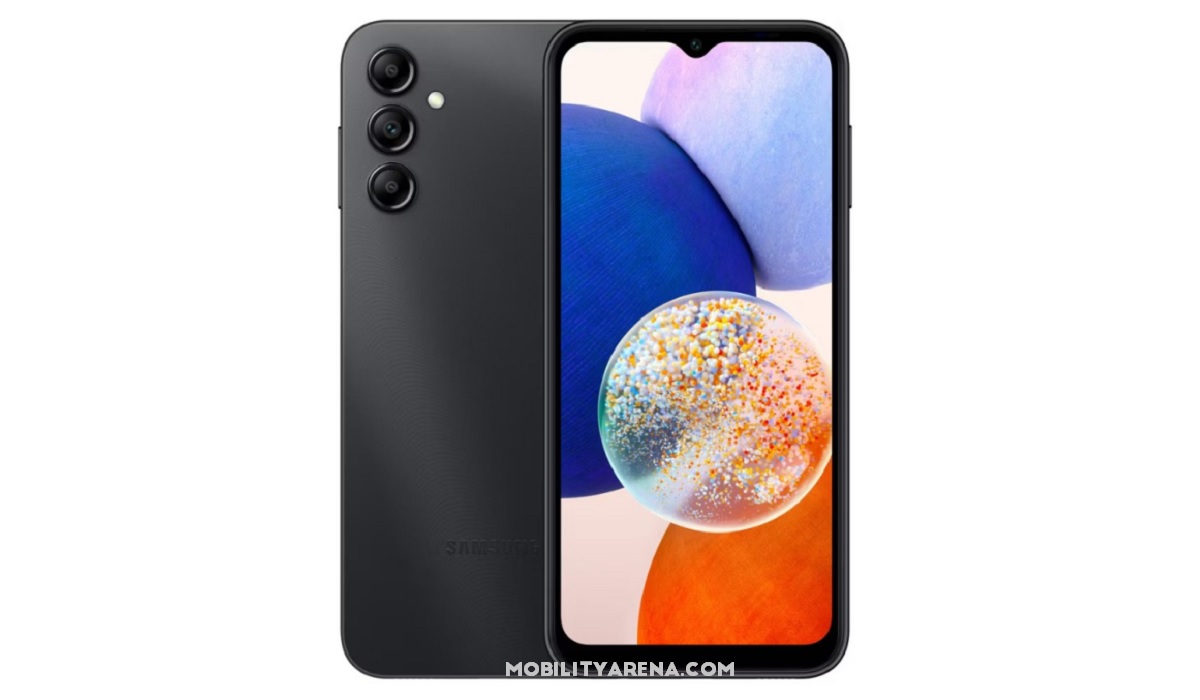
Samsung Galaxy A15 unlocked 4G smartphone in black
Samsung Galaxy A15: Your Questions Answered
In this section, we answer some of the most common questions users are asking about Samsung Galaxy A15 unlocked 4G smartphone.
Is Samsung A15 waterproof?
It is. Samsung A15 has no ingress protection (IP rating). It is not water proof. Do your best to avoid splashes of water or of any other liquid.
Does Samsung Galaxy A15 support eSIM?
The Galaxy A15 unlocked 4G smartphone does not support eSIM, so you cannot use an eSIM with it.
Is Samsung Galaxy A15 dual SIM?
The Galaxy A15 has both single SIM and dual SIM versions..
Does Samsung Galaxy A15 have wireless charging?
Unfortunately, Samsung A15 does not have any form of wireless charging. You can only charge it via a cable.
Does Samsung A15 have glass back?
Being an entry-level Android phone, the Galaxy A15 does not have a glass back. The back panel is made of plastic.
Does Samsung A15 have a fingerprint sensor?
The Galaxy A15 has a fingerprint sensor located in the power button on the side of the phone.
Does Galaxy A15 have Gorilla Glass?
Samsung Galaxy A15 does not have Gorilla Glass on its display.
Does Samsung A15 support fast charging?
The Galaxy A15 is equipped with a 5000mAh battery and 15W fast charging.
Does the Samsung Galaxy A15 have a headphone jack?
The Galaxy A15 does not have a headphone jack. As such, you can only use a Bluetooth wireless earphone or a USB-C earphone.
Will Samsung Galaxy A15 get Android 14?
It is not clear at this time whether the Galaxy A15 will get updated to Android 14 or not.
Is Samsung Galaxy A15 unlocked?
In the United States, the Galaxy A15 is available in both unlocked and locked forms, depending on what carrier or retailer you buy it from. Ask your carrier for details.
Does Samsung have stores in the US?
Samsung has multiple stores in the United States where you can walk in to buy their phones. Visit Samsung.com USA and use the Store Locator tool to find the locations of Samsung stores in the USA.
Having answered these key questions, you might want to have a look at the detailed specifications and price of the phone in the section below.
Samsung Galaxy A15 Specs
Mobile Wireless Network and Software
- 2G mobile network bands : GSM, GPRS, EDGE 850 / 900 / 1800 / 1900 MHz.
- 3G mobile network bands : UMTS, WCDMA, HSDPA 850 / 900 / 2100 MHz
- 4G mobile network bands : LTE.
- 5G mobile network bands : No.
- SIM Type : Nano-SIM, Dual SIM
- Software / OS : Android 14 + OneUI 6
Design, Form Factor, Appearance
- Dimensions : 160.1 x 76.8 x 8.4 mm
- Weight : 200g
- Display : 6.5 inches, 1080 x 2400 pixels, 19.5:9 aspect ratio, 90Hz refresh rate, Super AMOLED screen
- Colours : Black. Dark Red. White/Silver. Blue Black.
- Physical Build : Plastic frame; plastic back
Internal Hardware Specs
- Processor Type : 64-bit, Octa-core Cortex-A76
- Processor Name : MediaTek Helio G99
- Graphics Processor : ARM Mali-G57 MC2
- RAM : 4 GB / 6 GB / 8 GB.
- Internal Storage : 128 GB / 256 GB
- External Storage : microSD, up to 512 GB (shared slot)
Photography, Video Recording
- Main Camera : 50 MP ISOCELL JN1 wide angle lens + 5 MP f/2.2 UltraWide lens + 2 MP f/2.4 depth sensor, autofocus, LED flash, 1080p@30fps video recording
- Front Camera : 13 MP, Face Recognition, 1080p@30fps video capture
Audio, Video Playback
- Music Support : PCM, AAC / AAC + / eAAC + / MP3 / AMR – NB / WB / APE
- Audio : 3.5 mm audio jack
- Loudspeaker : Mono speaker
- Video Support : H.264/MP4/MPEG4 player
- FM Radio : Yes (International version only)
Phone Sensors
- Digital Compass : No.
- Accelerometer : Yes.
- Proximity Sensor : Yes.
- Ambient Light Sensor : Yes.
- Barometer : No.
- Pedometer : No.
- Heart Rate Monitor : No.
- Gyroscope (G-Sensor) : Yes.
- Fingerprint Scanner : Yes; side-mounted.
- Face Unlock : Yes.
- Iris Scanner : No.
- Motion Sensing / Gesture Control : No.
- Voice Control : No.
- Intelligent Digital Assistant : Yes; Google Assistant.
- Infra-red Sensor : No.
Connectivity Options
- Bluetooth Version : 5.0
- Bluetooth Profiles : A2DP
- WiFi : Wi-Fi 802.11 a/b/g/n/ac, hotspot
- GPS : Yes, A-GPS, GLONASS, GALILEO
- USB : microUSB v2.0. Type-C
- NFC : Yes
Miscellaneous Specs
- Battery Type and Capacity : Non-Removable Lithium-Polymer 5000 mAh
- Battery Charging : 15W fast charging
- Wireless Charging : No.
- Reverse Charging : No.
- Model Version/Numbers : SM-A156B, SM-A156B/DS, SM-A156P, SM-A156P/DS, SM-A156U, SM-A156U1, SM-A156U1/DS, SM-A156W, SM-A156P/N, SM-A156P/DSN, SM-S156VL, SM-A156M, SM-A156E
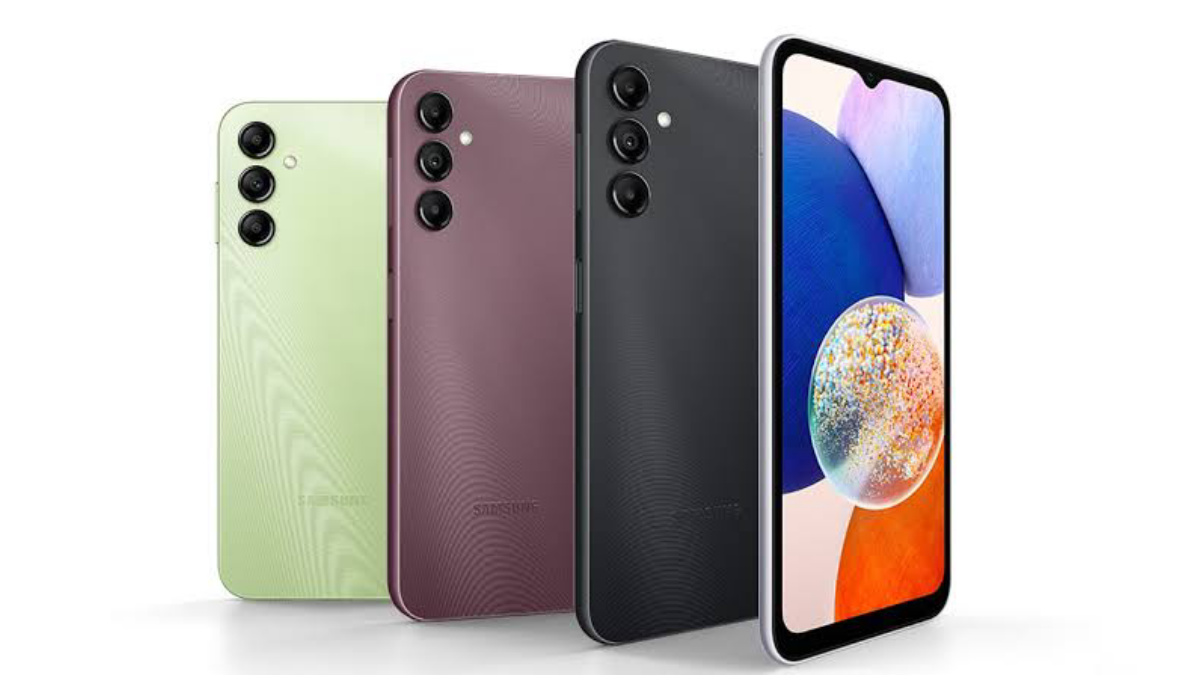
Samsung A15 unlocked 4G smartphone is available in a range of colours, depending on region and country.
When was Samsung Galaxy A15 unlocked 4G smartphone released?
- Announced : December 2923
- Release Date : December 2023
Price: How much isSamsung Galaxy A15 unlocked 4G smartphone in the USA, UK, EU?
- USA : from $170 .
- Canada : from CA$252
- United Kingdom (UK ): £
- European Union : from €175
- United Arab Emirates (UAE) : from AED
The above prices may change with time from country to country, as market forces and economic policies influence product price movements.
Does Samsung Galaxy A15 have Google Play Store?
It supports Google Services and software applications, including Play Store and Maps, Gmail, YouTube, and others.
Will Samsung Galaxy A15 unlocked 4G smartphone work in the USA?
This is a GSM phone and is supported on US GSM carriers like AT&T and T-Mobile and other networks riding on their networks. It does not support CDMA networks. Do make enquiries from your carrier to know what bands/frequencies are supported on their service.
Is Samsung Galaxy A15 unlocked 4G smartphone worth buying?
Samsung A15 is an excellent package for the price, and we recommend it to those looking for a sub-$200 unlocked 4G smartphone in the United States where most Chinese phone brands are not available. However, in most places outside of the USA, you will find much better phones at the same price point.
The above is a recommendation based on the specifications of the device and a general guide to help you understand how much value a device offers for its price. It is not an endorsement of the device. Ask questions and use your judgement when buying any device; MobilityArena takes no responsibility for your buying decisions .
Review Rating
4.0/5.0
