Add MobilityArena as a preferred source on Google
If you did not experience it, you probably would never believe it. For all of the hype around the iPhone, millions of users around the world are wondering why their iPhone is slower on WiFi while their laptops and Android smartphones are blazing fast on the same WiFi network. But you have experienced it, which is why you are reading this article. Why is your iPhone slower on WiFi than your laptop and Android phone?
First, let me assure you that I conducted measured tests to verify that this phenomenon is actually happening. I took an up-to-date iPhone SE 2022, with the most powerful mobile processor in the market today, and pitched it against a lowly mid-range Android phone with a lowly Helio P70 processor, the Unihertz Titan Slim . This Android phone is not a flagship device. It isn’t even close. But it gets much faster speeds on the same WiFi network as the iPhone SE 2022. How much faster? As much as three times faster.
Why Is Your iPhone Slower On WiFi?
In the latest speed test that I ran, the iPhone scored 2.76 Mbps download, while the Android phone scored 8.00 Mbps. But it isn’t about speed tests alone. What led me to begin to investigate this matter and run comparison speed tests was that anytime I use the iPhone on WiFi, I find that web pages load slower, Twitter, Instagram and other social networks load slower, and it takes a while before any media load in all apps on the phone. This was not happening on the Android phone. So, I began to measure things. I used the same speed test app every time.
What I Found Out: Situations In Which The iPhone Is Slower On WiFi
I found out that when using the iPhone within two to three metres of the router, and without any obstructing wall between them, it performed as expected – everything loads fast and speed test results are at par with the Android phone’s. But once I move to another room and there is a wall between the router and the devices, the iPhone slows down considerably to about one third or one fourth of the speeds that other devices are getting.
While the iPhone becomes slow, laptops and Android phones run as fast as ever, even with a wall or two obstructing. Only the iPhone slows down. All other devices have no such issue and produce sterling speed test results. Interesting; right?
What Help Articles Say About How To Boost WiFi Signal On iPhone
I have read help articles that recommend restarting the iPhone to fix the issue. I did that, and nothing changed. Another recommended fix is to forget the WiFi network and reconnect. I did that and nothing changed. I restarted the iPhone multiple times; zilch. Another recommendation was that I perform a network reset of the iPhone. I did, and it didn’t change anything. Not one of the recommended fixes sorted it out. I also restarted the router; nada.
Once there is a wall (cement/concrete) between the iPhone SE 2022 and the WiFi router, browsing slows down significantly – enough to force me to switch to mobile data oftentimes. This problem is not that of a particular iPhone model. So, it isn’t restricted to the SE 2022. Users of iPhone 12 models, iPhone 13 models, and other Phone models are out there looking for how to speed up their iPhone on WiFi. It is ridiculous, considering that these devices cost an arm and a leg.
Oh! A few articles say that using a thick case on the iPhone could also be responsible. Well, I took off the case on this one and it didn’t change anything. It does not appear that there is a universal solution (or any solution at all to iPhone being slow on WiFi). There is only one thing you can do.
What You Can Do To Speed Up iPhone on WiFi Network
Stay within line of sight of the phone. Avoid thick walls between the device and the router, and you will enjoy blazing fast Internet speeds. That is the only thing that works in my own case. Nothing else does. It is such an experience, considering the cost of iDevices.
- Don’t miss our mobile phone reviews .
- Follow our news on Google News .
- Join our WhatsApp Group , to be notified of the most important articles and deals,
- Follow us on Instagram , Facebook , Twitter , and YouTube .
Author:Mister Mobility
Digital Skills and Communication Coach | Mobile Phone Connoisseur since 2001 | Tech Blogging since 2004
Add MobilityArena as a preferred source on Google
Tech rumourville once announced that the iPhone 16E (formerly called iPhone SE 4th Generation) would never see the light of day, because the SE 3 was the last release of that lineup. Fresh information coming out says that has changed and that you can expect the iPhone SE 4 in 2025. It will sell in the United States, Canada, the United Kingdom, and other markets.
Welcome to our complete guide to the iPhone 16E. We have everything you need to know about this mobile device, including its specifications, price, release date, and more.
The iPhone 16E (also called the iPhone SE4 and iPhone SE 2025) will be based on the design of the iPhone 14. The iPhone SE range finally ditches the dated design and Home button to adopt a full screen display. That is a good thing; right? We bet that some people will miss the Home button.
iPhone 16E brief information
- OS: iOS 18
- Release Date: 2025
- Network Type: 2G/3G/4G/5G
- Display: 6.1-inch, 1170 x 2532 pixels resolution, 60 Hz OLED
- Processor: Apple A18 Bionic
- Selfie Camera: 12 MP
- Rear camera: 48 MP
- RAM: 6 GB
- ROM: 256 GB
- Battery:
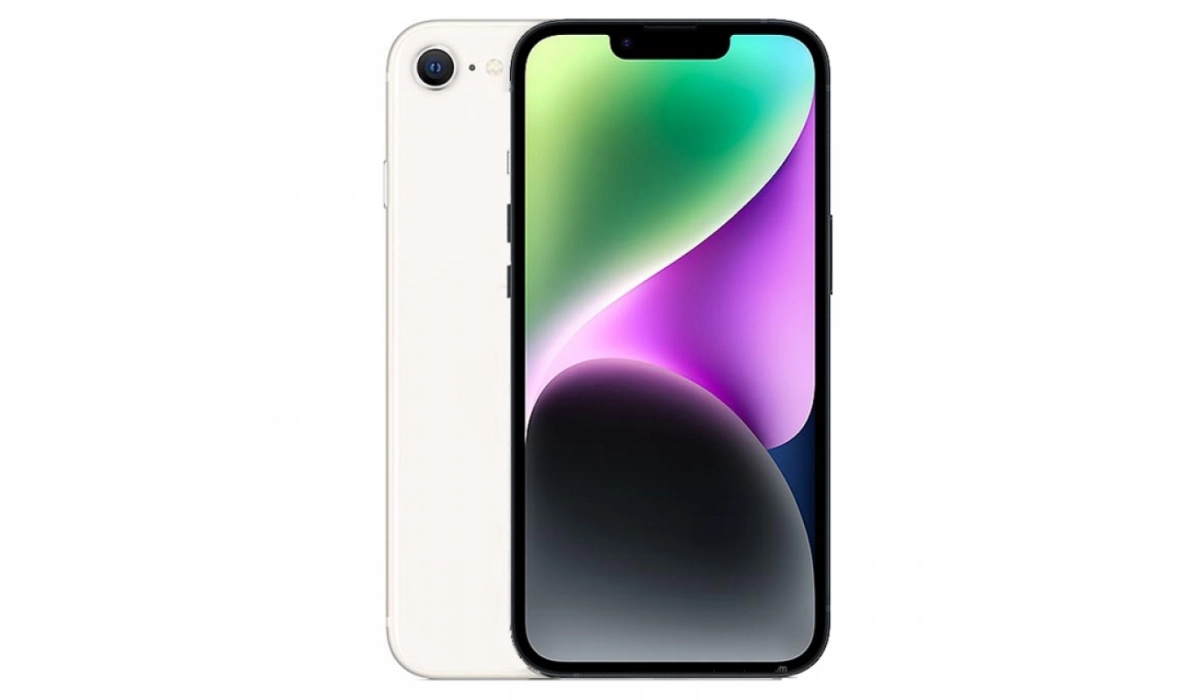
Apple iPhone 16E (iPhone SE 4th Gen) is based on the design of the iPhone 14
- Does iPhone 16E have IR blaster (infrared port)?
- Does iPhone SE4 have wireless charging?
- Does iPhone SE4 have Gorilla Glass?
- Does iPhone SE 4 have aptX Bluetooth codecs?
- Does iPhone SE 4 have 3.5mm audio jack?
- Apple iPhone 16E Specifications
- Price in the United States
- Price in Canada
- Price in the UK
- Price in Australia
- Price in the EU (Germany, Netherlands)
- MobilityArena Buyer’s Guide Verdict
- iPhone 16E Review Rating
Does iPhone 16E have IR blaster (infrared port)?
The iPhone SE4 does not have an infrared port (IR blaster).
Does iPhone SE4 have wireless charging?
The iPhone SE 4th gen supports Qi based wireless charging.
Does iPhone SE4 have Gorilla Glass?
The iPhone SE4 uses ceramic shield glass as protection over the display.
Does iPhone SE 4 have aptX Bluetooth codecs?
The iPhone SE4 does not support any aptX Bluetooth codecs.
Does iPhone SE 4 have 3.5mm audio jack?
Apple does not include a 3.5mm headphone jack in the iPhone SE4.
Apple iPhone 16E Specifications
Mobile Wireless Network and Software
- 2G mobile network bands : GSM, GPRS, EDGE 850 / 900 / 1800 / 1900 MHz.
- 3G mobile network bands : UMTS, WCDMA, HSDPA 850 / 900 / 2100 MHz
- 4G mobile network bands : LTE.
- 5G mobile network bands : NSA/SA
- SIM Type : Nano-SIM, eSIM
- Software / OS : iOS 18
Design, Form Factor, Appearance
- Dimensions : 160 x 77.25 x 9.3 mm
- Weight : 195g
- Display : 6.1 inches, 1170 x 2532 pixels, 60 Hz refresh rate, Super Retina OLED screen, Scratch-resistant Ceramic Shield glass
- Colours : Red. White. Black.
- Physical Build : Aluminum frame; glass back; IP67 dust/water resistant (up to 1m for 30 mins)
Internal Hardware Specs
- CPU/ Processor : 4.0 GHz Hexa-core
- Chipset : Apple A18 Bionic
- GPU/ Graphics Processing Unit : Apple GPU (5-core)
- RAM : 6 GB
- Extended/Virtual RAM : N/A
- Internal Storage : 128 GB / 256 GB NVMe
- External Storage : No
Photography, Video Recording
- Main Camera : 48 MP autofocus, dual LED flash, 4k video, 1080p@30fps video recording, OIS, HDR
- Front Camera : 12 MP fixed focus, Face Recognition, 1080p@30fps video capture, HDR
Audio, Video Playback
- Music Support : PCM, AAC / AAC + / eAAC + / MP3 / AMR – NB / WB / APE
- Audio : No 3.5 mm audio jack
- Loudspeaker : Stereo speakers
- Video Support : H.264/MP4/MPEG4 player
- FM Radio : No.
Phone Sensors
- Digital Compass : Yes.
- Accelerometer : Yes.
- Proximity Sensor : Yes.
- Ambient Light Sensor : Yes.
- Barometer : No.
- Pedometer : No.
- Heart Rate Monitor : No.
- Gyroscope (G-Sensor) : Yes.
- Fingerprint Scanner : No.
- Face Unlock : Yes.
- Iris Scanner : No.
- Motion Sensing / Gesture Control : No.
- Voice Control : No.
- Intelligent Digital Assistant : Yes; Siri.
- Infra-red Blaster : No.
Connectivity Options
- Bluetooth Version : 5.3
- Bluetooth Profiles : A2DP LE
- WiFi : Wi-Fi 802.11 a/b/g/n/ac/6, hotspot
- GPS : Yes, A-GPS, GLONASS, BDS, Galileo, QZSS
- USB : microUSB v2.0. Type-C.
- NFC : Yes.
Miscellaneous Specs and Features
- Battery Type and Capacity : Non-Removable Lithium-Polymer
- Battery Charging : 27W fast charging
- Wireless Charging : 7.5W Qi standard.
- Reverse Charging : No.
- Model Version/Number :
Launch/Release Dates and Information
- Announced : Expected in Q2 2025
- Release Date : Expected in Q2 2025
Pricein the United States
- USA : $499 (Expected)
Price in Canada
- Canada :
Price in the UK
- United Kingdom (UK):
Price in Australia
- Australia :
Price in the EU (Germany, Netherlands)
- European Union (EU):
The above prices may change with time from country to country, as market forces and economic policies influence product price movements.
MobilityArena Buyer’s Guide Verdict
For the first time, an iPhone SE model drops the dated traditional iPhone design with bezels and a Home button. The Apple iPhone 16E model takes on the design of the iPhone 14 and so has a wide notch. This is a good step forward, but it means lovers of the fingerprint scanner now have to do without.
Our Buyer’s Guide Verdict is a recommendation based on the specificationss of the device and a general guide to help you understand how much value a device offers for its price. It is not an endorsement of the device. Ask questions and use your judgement when buying any device; MobilityArena takes no responsibility for your buying decisions .
iPhone 16E Review Rating
Not available.
