Add MobilityArena as a preferred source on Google
The only good thing that side-mounted fingerprint scanners have going for them is that they are affordable and so allow manufacturers to include a fingerprint reader in entry-level smartphones. That aside, side-mounted fingerprint scanners are a terrible idea and need to go away as fast as possible.
Side-mounted fingerprint scanners are a type of biometric security feature that are embedded in the power button of some smartphones. To unlock the device, you have to place your thumb or other finger on the power button.
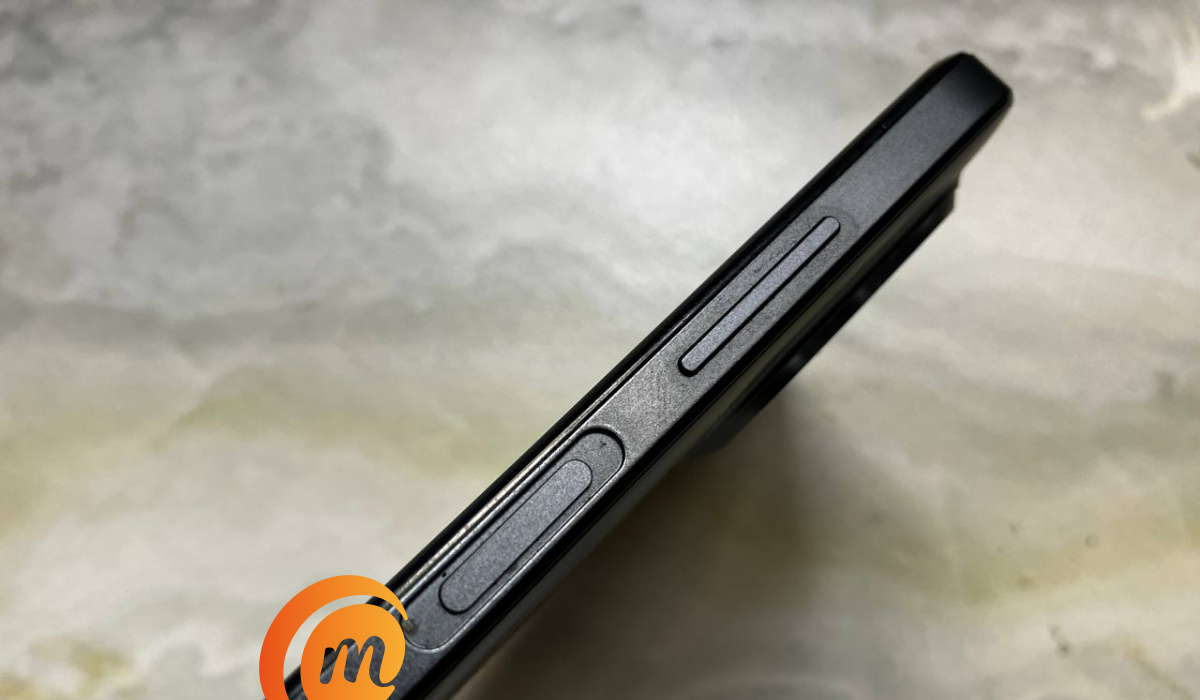
- Side-mounted fingerprint scanners deliver poor usability
- Side-mounted fingerprint scanners inadvertantly do unintended things
- Not user-friendly for left-handed folks
- Side-mounted fingerprint scanners have a smaller surface area
- Why do foldable phones have side-mounted fingerprint scanners and not in-display scanners?
Side-mounted fingerprint scanners deliver poor usability
How many times have you held your smartphone in your hand and your thumb naturally rested on the edge of your phone? Never; right? Hovering over the screen is the natural position of our thumb when holding a phone, which is just perfect for in-display or under-display fingerprint scanners. Where your phone has a side-mounted scanner, every time you need to unlock it or unlock an app, your thumb has to leave its natural position on the screen and travel to the edge to do so. If you have to do that often, it gets tiring.
For example, if you have app lock enabled on your smartphone for a number of apps, each time you switch to that app, your thumb has to do that travelling to the side or edge where your phone’s power button is located. Every single time. If you have done that 10 times in 30 minutes, you already know how tedious it is. If you have to do it 30 times in 30 minutes….
Side-mounted fingerprint scanners inadvertantly do unintended things
Besides the issue of natural placement, as my buddy Muyiwa reiterated, side-mounted fingerprint scanners have a habit of inadvertently unlocking your phone when you either simply want to adjust it in your pocket, or check time/notifications without unlocking the phone. I know it, too, from experience. It is so annoying.
Not user-friendly for left-handed folks
Side-mounted fingerprint scanners tend to not be convenient for left-handed users or users who switch hands frequently, as they may have to adjust their grip or use a different finger to unlock the phone. In contrast, an in-display or rear scanner does not discriminate against whatever hand you are more comfortable using.
Side-mounted fingerprint scanners have a smaller surface area
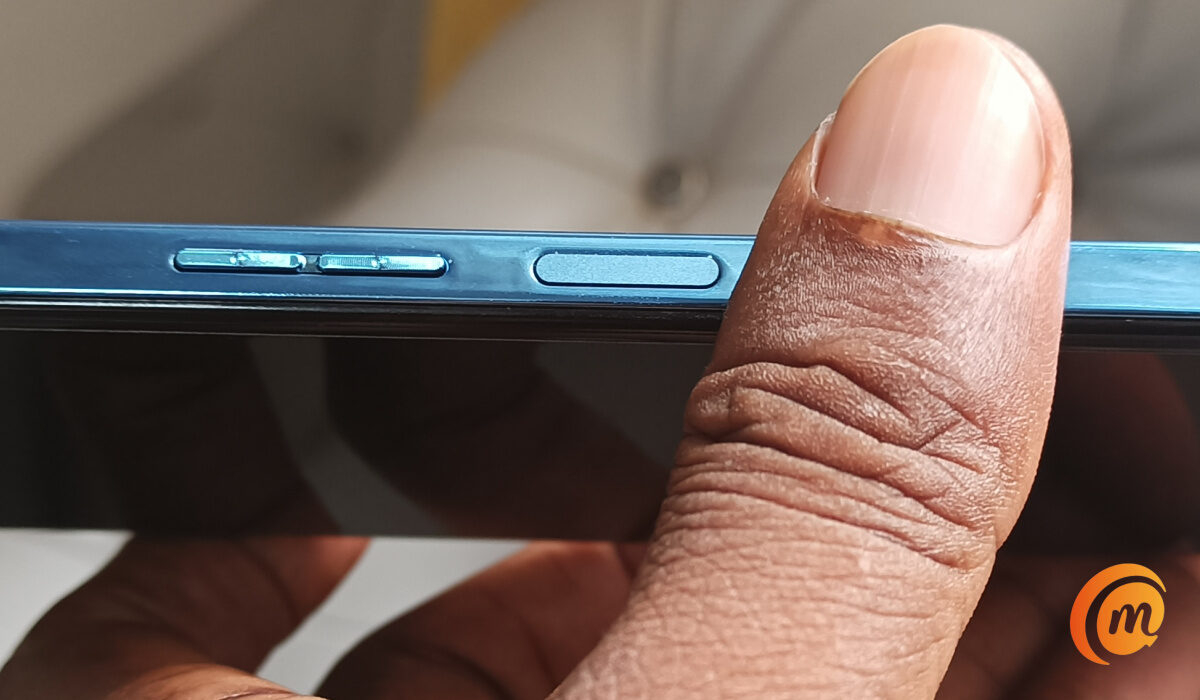
Generally, side-mounted readers have a smaller surface area than in-display and rear-mounted readers. In day-to-day use, this often results in a reduction of the accuracy and security of the scan. Even when registering your fingerprint using a side-mounted scanner, you tend to need to do repeated imprints to have your fingerprint properly registered.
Am I saying that side-mounted fingerprint scanners are useless? Of course, they are not. They serve a purpose. Like I already pointed out, they are great for entry-level devices, because they are better than not having one at all. Personally, though, for entry-level phones, I would rather the scanner is on the back than on the side.
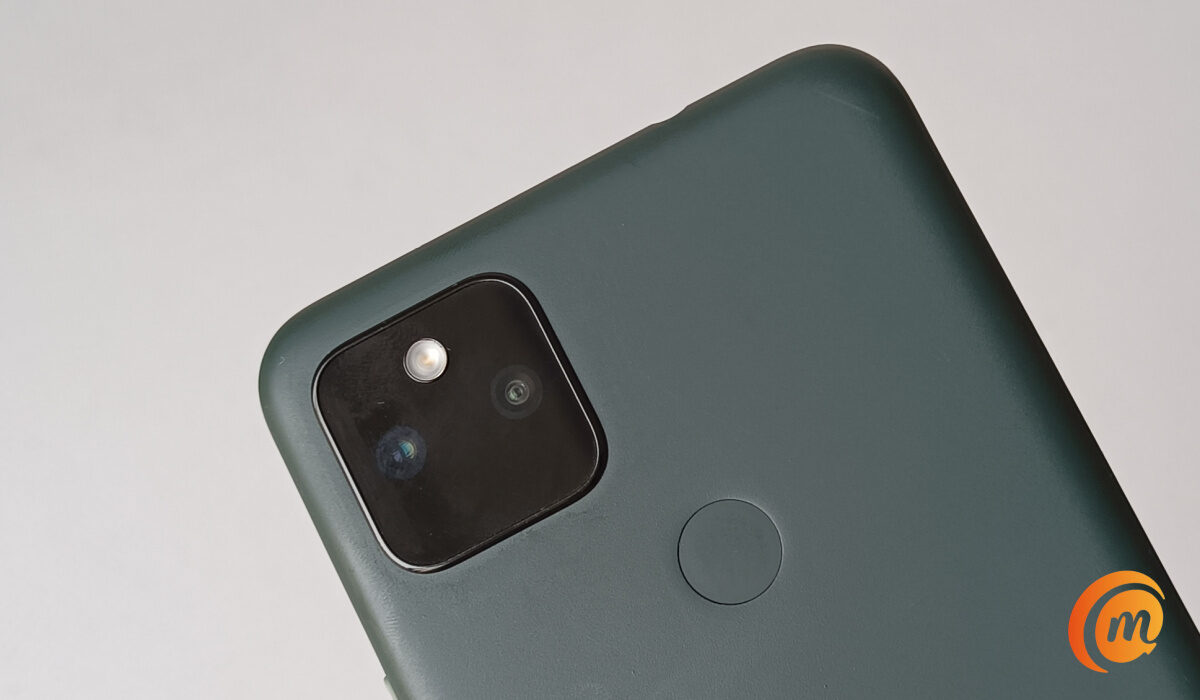
But smartphone companies have decided that they need the back area for bigger camera modules and other features, so that is likely wishful thinking. Budget smartphone will likely have make do with side-mointed fingerprint scanners for a long time. What I do not get is why anyone should have to out up with them on more premium devices.
Smartphone makers have said goodbye to rear fingerprint scanners
Why do foldable phones have side-mounted fingerprint scanners and not in-display scanners?
Why are there side-mounted scanners on premium, high-end phones? This is prevalent among foldable phones, to be more specific.
First, side-mounted scanners allow for folding phones to be unlocked in both closed and open states. A foldable phone would need two in-display scanners for that. The Vivo. X Fold2, with its dual under-display scanners, is an example of this. But this is an outlier; most manufacturers generally go with a side fingerprint scanner on their foldable devices.
Secondly, side-mounted scanners are generally more cost effective to implement. They are mature technology, compared to in-display scanners. As the prices of foldable phones drop, I expect that more manufacturers will also drop the side scanner arrangement.
The early days of in-display scanners were problematic. As with most new technology, it had its fair share of issues, including reliability issues. But those days are past now and in-display scanners have proven themselves to be as secure, as fast, and as reliable as older types of scanners. And they are perfect for usability because the scanner spot is right where your thumb naturally hovers over your phone screen.
Hopefully, side-mounted fingerprint scanners will disappear completely one day and in-display scanners, especially the ultrasonic type , rule the smartphone world. Or we might have to embrace something new entirely.
Author:Mister Mobility
Digital Skills and Communication Coach | Mobile Phone Connoisseur since 2001 | Tech Blogging since 2004
Add MobilityArena as a preferred source on Google
The only good thing that side-mounted fingerprint scanners have going for them is that they are affordable and so allow manufacturers to include a fingerprint reader in entry-level smartphones. That aside, side-mounted fingerprint scanners are a terrible idea and need to go away as fast as possible.
Side-mounted fingerprint scanners are a type of biometric security feature that are embedded in the power button of some smartphones. To unlock the device, you have to place your thumb or other finger on the power button.
- Side-mounted fingerprint scanners deliver poor usability
- Side-mounted fingerprint scanners inadvertantly do unintended things
- Not user-friendly for left-handed folks
- Side-mounted fingerprint scanners have a smaller surface area
- Why do foldable phones have side-mounted fingerprint scanners and not in-display scanners?
Side-mounted fingerprint scanners deliver poor usability
How many times have you held your smartphone in your hand and your thumb naturally rested on the edge of your phone? Never; right? Hovering over the screen is the natural position of our thumb when holding a phone, which is just perfect for in-display or under-display fingerprint scanners. Where your phone has a side-mounted scanner, every time you need to unlock it or unlock an app, your thumb has to leave its natural position on the screen and travel to the edge to do so. If you have to do that often, it gets tiring.
For example, if you have app lock enabled on your smartphone for a number of apps, each time you switch to that app, your thumb has to do that travelling to the side or edge where your phone’s power button is located. Every single time. If you have done that 10 times in 30 minutes, you already know how tedious it is. If you have to do it 30 times in 30 minutes….
Side-mounted fingerprint scanners inadvertantly do unintended things
Besides the issue of natural placement, as my buddy Muyiwa reiterated, side-mounted fingerprint scanners have a habit of inadvertently unlocking your phone when you either simply want to adjust it in your pocket, or check time/notifications without unlocking the phone. I know it, too, from experience. It is so annoying.
Not user-friendly for left-handed folks
Side-mounted fingerprint scanners tend to not be convenient for left-handed users or users who switch hands frequently, as they may have to adjust their grip or use a different finger to unlock the phone. In contrast, an in-display or rear scanner does not discriminate against whatever hand you are more comfortable using.
Side-mounted fingerprint scanners have a smaller surface area
Generally, side-mounted readers have a smaller surface area than in-display and rear-mounted readers. In day-to-day use, this often results in a reduction of the accuracy and security of the scan. Even when registering your fingerprint using a side-mounted scanner, you tend to need to do repeated imprints to have your fingerprint properly registered.
Am I saying that side-mounted fingerprint scanners are useless? Of course, they are not. They serve a purpose. Like I already pointed out, they are great for entry-level devices, because they are better than not having one at all. Personally, though, for entry-level phones, I would rather the scanner is on the back than on the side.
But smartphone companies have decided that they need the back area for bigger camera modules and other features, so that is likely wishful thinking. Budget smartphone will likely have make do with side-mointed fingerprint scanners for a long time. What I do not get is why anyone should have to out up with them on more premium devices.
Smartphone makers have said goodbye to rear fingerprint scanners
Why do foldable phones have side-mounted fingerprint scanners and not in-display scanners?
Why are there side-mounted scanners on premium, high-end phones? This is prevalent among foldable phones, to be more specific.
First, side-mounted scanners allow for folding phones to be unlocked in both closed and open states. A foldable phone would need two in-display scanners for that. The Vivo. X Fold2, with its dual under-display scanners, is an example of this. But this is an outlier; most manufacturers generally go with a side fingerprint scanner on their foldable devices.
Secondly, side-mounted scanners are generally more cost effective to implement. They are mature technology, compared to in-display scanners. As the prices of foldable phones drop, I expect that more manufacturers will also drop the side scanner arrangement.
The early days of in-display scanners were problematic. As with most new technology, it had its fair share of issues, including reliability issues. But those days are past now and in-display scanners have proven themselves to be as secure, as fast, and as reliable as older types of scanners. And they are perfect for usability because the scanner spot is right where your thumb naturally hovers over your phone screen.
Hopefully, side-mounted fingerprint scanners will disappear completely one day and in-display scanners, especially the ultrasonic type , rule the smartphone world. Or we might have to embrace something new entirely.
Author:Mister Mobility
Digital Skills and Communication Coach | Mobile Phone Connoisseur since 2001 | Tech Blogging since 2004
Add MobilityArena as a preferred source on Google
The only good thing that side-mounted fingerprint scanners have going for them is that they are affordable and so allow manufacturers to include a fingerprint reader in entry-level smartphones. That aside, side-mounted fingerprint scanners are a terrible idea and need to go away as fast as possible.
Side-mounted fingerprint scanners are a type of biometric security feature that are embedded in the power button of some smartphones. To unlock the device, you have to place your thumb or other finger on the power button.
- Side-mounted fingerprint scanners deliver poor usability
- Side-mounted fingerprint scanners inadvertantly do unintended things
- Not user-friendly for left-handed folks
- Side-mounted fingerprint scanners have a smaller surface area
- Why do foldable phones have side-mounted fingerprint scanners and not in-display scanners?
Side-mounted fingerprint scanners deliver poor usability
How many times have you held your smartphone in your hand and your thumb naturally rested on the edge of your phone? Never; right? Hovering over the screen is the natural position of our thumb when holding a phone, which is just perfect for in-display or under-display fingerprint scanners. Where your phone has a side-mounted scanner, every time you need to unlock it or unlock an app, your thumb has to leave its natural position on the screen and travel to the edge to do so. If you have to do that often, it gets tiring.
For example, if you have app lock enabled on your smartphone for a number of apps, each time you switch to that app, your thumb has to do that travelling to the side or edge where your phone’s power button is located. Every single time. If you have done that 10 times in 30 minutes, you already know how tedious it is. If you have to do it 30 times in 30 minutes….
Side-mounted fingerprint scanners inadvertantly do unintended things
Besides the issue of natural placement, as my buddy Muyiwa reiterated, side-mounted fingerprint scanners have a habit of inadvertently unlocking your phone when you either simply want to adjust it in your pocket, or check time/notifications without unlocking the phone. I know it, too, from experience. It is so annoying.
Not user-friendly for left-handed folks
Side-mounted fingerprint scanners tend to not be convenient for left-handed users or users who switch hands frequently, as they may have to adjust their grip or use a different finger to unlock the phone. In contrast, an in-display or rear scanner does not discriminate against whatever hand you are more comfortable using.
Side-mounted fingerprint scanners have a smaller surface area
Generally, side-mounted readers have a smaller surface area than in-display and rear-mounted readers. In day-to-day use, this often results in a reduction of the accuracy and security of the scan. Even when registering your fingerprint using a side-mounted scanner, you tend to need to do repeated imprints to have your fingerprint properly registered.
Am I saying that side-mounted fingerprint scanners are useless? Of course, they are not. They serve a purpose. Like I already pointed out, they are great for entry-level devices, because they are better than not having one at all. Personally, though, for entry-level phones, I would rather the scanner is on the back than on the side.
But smartphone companies have decided that they need the back area for bigger camera modules and other features, so that is likely wishful thinking. Budget smartphone will likely have make do with side-mointed fingerprint scanners for a long time. What I do not get is why anyone should have to out up with them on more premium devices.
Smartphone makers have said goodbye to rear fingerprint scanners
Why do foldable phones have side-mounted fingerprint scanners and not in-display scanners?
Why are there side-mounted scanners on premium, high-end phones? This is prevalent among foldable phones, to be more specific.
First, side-mounted scanners allow for folding phones to be unlocked in both closed and open states. A foldable phone would need two in-display scanners for that. The Vivo. X Fold2, with its dual under-display scanners, is an example of this. But this is an outlier; most manufacturers generally go with a side fingerprint scanner on their foldable devices.
Secondly, side-mounted scanners are generally more cost effective to implement. They are mature technology, compared to in-display scanners. As the prices of foldable phones drop, I expect that more manufacturers will also drop the side scanner arrangement.
The early days of in-display scanners were problematic. As with most new technology, it had its fair share of issues, including reliability issues. But those days are past now and in-display scanners have proven themselves to be as secure, as fast, and as reliable as older types of scanners. And they are perfect for usability because the scanner spot is right where your thumb naturally hovers over your phone screen.
Hopefully, side-mounted fingerprint scanners will disappear completely one day and in-display scanners, especially the ultrasonic type , rule the smartphone world. Or we might have to embrace something new entirely.
Author:Mister Mobility
Digital Skills and Communication Coach | Mobile Phone Connoisseur since 2001 | Tech Blogging since 2004
Add MobilityArena as a preferred source on Google
The only good thing that side-mounted fingerprint scanners have going for them is that they are affordable and so allow manufacturers to include a fingerprint reader in entry-level smartphones. That aside, side-mounted fingerprint scanners are a terrible idea and need to go away as fast as possible.
Side-mounted fingerprint scanners are a type of biometric security feature that are embedded in the power button of some smartphones. To unlock the device, you have to place your thumb or other finger on the power button.
- Side-mounted fingerprint scanners deliver poor usability
- Side-mounted fingerprint scanners inadvertantly do unintended things
- Not user-friendly for left-handed folks
- Side-mounted fingerprint scanners have a smaller surface area
- Why do foldable phones have side-mounted fingerprint scanners and not in-display scanners?
Side-mounted fingerprint scanners deliver poor usability
How many times have you held your smartphone in your hand and your thumb naturally rested on the edge of your phone? Never; right? Hovering over the screen is the natural position of our thumb when holding a phone, which is just perfect for in-display or under-display fingerprint scanners. Where your phone has a side-mounted scanner, every time you need to unlock it or unlock an app, your thumb has to leave its natural position on the screen and travel to the edge to do so. If you have to do that often, it gets tiring.
For example, if you have app lock enabled on your smartphone for a number of apps, each time you switch to that app, your thumb has to do that travelling to the side or edge where your phone’s power button is located. Every single time. If you have done that 10 times in 30 minutes, you already know how tedious it is. If you have to do it 30 times in 30 minutes….
Side-mounted fingerprint scanners inadvertantly do unintended things
Besides the issue of natural placement, as my buddy Muyiwa reiterated, side-mounted fingerprint scanners have a habit of inadvertently unlocking your phone when you either simply want to adjust it in your pocket, or check time/notifications without unlocking the phone. I know it, too, from experience. It is so annoying.
Not user-friendly for left-handed folks
Side-mounted fingerprint scanners tend to not be convenient for left-handed users or users who switch hands frequently, as they may have to adjust their grip or use a different finger to unlock the phone. In contrast, an in-display or rear scanner does not discriminate against whatever hand you are more comfortable using.
Side-mounted fingerprint scanners have a smaller surface area
Generally, side-mounted readers have a smaller surface area than in-display and rear-mounted readers. In day-to-day use, this often results in a reduction of the accuracy and security of the scan. Even when registering your fingerprint using a side-mounted scanner, you tend to need to do repeated imprints to have your fingerprint properly registered.
Am I saying that side-mounted fingerprint scanners are useless? Of course, they are not. They serve a purpose. Like I already pointed out, they are great for entry-level devices, because they are better than not having one at all. Personally, though, for entry-level phones, I would rather the scanner is on the back than on the side.
But smartphone companies have decided that they need the back area for bigger camera modules and other features, so that is likely wishful thinking. Budget smartphone will likely have make do with side-mointed fingerprint scanners for a long time. What I do not get is why anyone should have to out up with them on more premium devices.
Smartphone makers have said goodbye to rear fingerprint scanners
Why do foldable phones have side-mounted fingerprint scanners and not in-display scanners?
Why are there side-mounted scanners on premium, high-end phones? This is prevalent among foldable phones, to be more specific.
First, side-mounted scanners allow for folding phones to be unlocked in both closed and open states. A foldable phone would need two in-display scanners for that. The Vivo. X Fold2, with its dual under-display scanners, is an example of this. But this is an outlier; most manufacturers generally go with a side fingerprint scanner on their foldable devices.
Secondly, side-mounted scanners are generally more cost effective to implement. They are mature technology, compared to in-display scanners. As the prices of foldable phones drop, I expect that more manufacturers will also drop the side scanner arrangement.
The early days of in-display scanners were problematic. As with most new technology, it had its fair share of issues, including reliability issues. But those days are past now and in-display scanners have proven themselves to be as secure, as fast, and as reliable as older types of scanners. And they are perfect for usability because the scanner spot is right where your thumb naturally hovers over your phone screen.
Hopefully, side-mounted fingerprint scanners will disappear completely one day and in-display scanners, especially the ultrasonic type , rule the smartphone world. Or we might have to embrace something new entirely.
Author:Mister Mobility
Digital Skills and Communication Coach | Mobile Phone Connoisseur since 2001 | Tech Blogging since 2004
Add MobilityArena as a preferred source on Google
The only good thing that side-mounted fingerprint scanners have going for them is that they are affordable and so allow manufacturers to include a fingerprint reader in entry-level smartphones. That aside, side-mounted fingerprint scanners are a terrible idea and need to go away as fast as possible.
Side-mounted fingerprint scanners are a type of biometric security feature that are embedded in the power button of some smartphones. To unlock the device, you have to place your thumb or other finger on the power button.
- Side-mounted fingerprint scanners deliver poor usability
- Side-mounted fingerprint scanners inadvertantly do unintended things
- Not user-friendly for left-handed folks
- Side-mounted fingerprint scanners have a smaller surface area
- Why do foldable phones have side-mounted fingerprint scanners and not in-display scanners?
Side-mounted fingerprint scanners deliver poor usability
How many times have you held your smartphone in your hand and your thumb naturally rested on the edge of your phone? Never; right? Hovering over the screen is the natural position of our thumb when holding a phone, which is just perfect for in-display or under-display fingerprint scanners. Where your phone has a side-mounted scanner, every time you need to unlock it or unlock an app, your thumb has to leave its natural position on the screen and travel to the edge to do so. If you have to do that often, it gets tiring.
For example, if you have app lock enabled on your smartphone for a number of apps, each time you switch to that app, your thumb has to do that travelling to the side or edge where your phone’s power button is located. Every single time. If you have done that 10 times in 30 minutes, you already know how tedious it is. If you have to do it 30 times in 30 minutes….
Side-mounted fingerprint scanners inadvertantly do unintended things
Besides the issue of natural placement, as my buddy Muyiwa reiterated, side-mounted fingerprint scanners have a habit of inadvertently unlocking your phone when you either simply want to adjust it in your pocket, or check time/notifications without unlocking the phone. I know it, too, from experience. It is so annoying.
Not user-friendly for left-handed folks
Side-mounted fingerprint scanners tend to not be convenient for left-handed users or users who switch hands frequently, as they may have to adjust their grip or use a different finger to unlock the phone. In contrast, an in-display or rear scanner does not discriminate against whatever hand you are more comfortable using.
Side-mounted fingerprint scanners have a smaller surface area
Generally, side-mounted readers have a smaller surface area than in-display and rear-mounted readers. In day-to-day use, this often results in a reduction of the accuracy and security of the scan. Even when registering your fingerprint using a side-mounted scanner, you tend to need to do repeated imprints to have your fingerprint properly registered.
Am I saying that side-mounted fingerprint scanners are useless? Of course, they are not. They serve a purpose. Like I already pointed out, they are great for entry-level devices, because they are better than not having one at all. Personally, though, for entry-level phones, I would rather the scanner is on the back than on the side.
But smartphone companies have decided that they need the back area for bigger camera modules and other features, so that is likely wishful thinking. Budget smartphone will likely have make do with side-mointed fingerprint scanners for a long time. What I do not get is why anyone should have to out up with them on more premium devices.
Smartphone makers have said goodbye to rear fingerprint scanners
Why do foldable phones have side-mounted fingerprint scanners and not in-display scanners?
Why are there side-mounted scanners on premium, high-end phones? This is prevalent among foldable phones, to be more specific.
First, side-mounted scanners allow for folding phones to be unlocked in both closed and open states. A foldable phone would need two in-display scanners for that. The Vivo. X Fold2, with its dual under-display scanners, is an example of this. But this is an outlier; most manufacturers generally go with a side fingerprint scanner on their foldable devices.
Secondly, side-mounted scanners are generally more cost effective to implement. They are mature technology, compared to in-display scanners. As the prices of foldable phones drop, I expect that more manufacturers will also drop the side scanner arrangement.
The early days of in-display scanners were problematic. As with most new technology, it had its fair share of issues, including reliability issues. But those days are past now and in-display scanners have proven themselves to be as secure, as fast, and as reliable as older types of scanners. And they are perfect for usability because the scanner spot is right where your thumb naturally hovers over your phone screen.
Hopefully, side-mounted fingerprint scanners will disappear completely one day and in-display scanners, especially the ultrasonic type , rule the smartphone world. Or we might have to embrace something new entirely.
Author:Mister Mobility
Digital Skills and Communication Coach | Mobile Phone Connoisseur since 2001 | Tech Blogging since 2004
Add MobilityArena as a preferred source on Google
I picked up a new smartphone to review the other day. As is my practice, I dived into fishing out every little bit of info about it and in the process, I stumbled on the fact that it has a 3D ultrasonic fingerprint sensor for biometric authentication. That inspired me to write an article explaining the different types of fingerprint scanners found in cell phones today.
The first thing to point out is that while all fingerprint sensors provide your phone with security, the level of accuracy, detail, and security they provide differs from one type to another. How fast they work also differs from one type to the other. Some types of fingerprint scanners also work better under certain conditions that others perform poorly in.
- Types of Fingerprint Scanners
- Optical Fingerprint Sensors
- Capacitive Fingerprint Sensors
- Ultrasonic Fingerprint Sensors
- Ultrasonic vs Capacitive vs Optical Fingerprint Sensors, in Summary
- Which type of fingerprint scanner is best biometric authentication?
Types of Fingerprint Scanners
Regardless of the location of the fingerprint scanner on a phone – In-display, rear, or side, there are three types of fingerprint sensors in use in cell phones today. They are: Optical, Capacitive, and Ultrasonic. Which type is used in a particular smartphone depends on a number of factors, including cost.
Optical Fingerprint Sensors
These sensors use light to scan the fingerprint and create a 2D image of the fingerprint. They are generally less expensive than other types of sensors but may not be as accurate and can be fooled by fake fingerprints.
Optical sensors are the most common type of fingerprint sensors found in a wide range of smartphones, from entry-level models all the way to premium flagships. The list of cell phones with an optical scanner include older flagships like the Samsung Galaxy S21 and Pixel 6 Pro, as well as more budget models like Pixel 4a, Motorola Moto G Power (2021), and LG Stylo 6.
Capacitive Fingerprint Sensors
These sensors use electronic capacitors to scan the fingerprint. They can detect the ridges of the fingerprint and are more accurate than optical sensors. They are commonly used in smartphones and are fast and reliable.
A capacitive sensor is much more difficult to fool than an optical scanner, because the results can’t be replicated with an image, and even are difficult to fool with a prosthetic, as different materials will record slightly different changes in charge at the capacitor. This makes capacitive fingerprint scanners much more secure than optical ones.
Capacitive fingerprint sensors are popular among budget and mid-range smartphones. Some examples of popular smartphones with a capacitive fingerprint sensor include: iPhone 5s through to iPhone 8, Google Pixel phones all the way to Pixel 5, OnePlus 8 and 9 models, and Nokia 5.4.
Ultrasonic Fingerprint Sensors
These sensors use ultrasonic waves to create a 3D image of the fingerprint. They are more accurate than optical sensors and can work even if the finger is dirty, oily, or wet. They are also more expensive than other types of sensors. Ultrasonic fingerprint scanners are the most secure. They are also the ones used in premium flagship smartphones.
Examples of phones with ultrasonic fingerprint sensors include Samsung Galaxy S23 , S23+, and S23 Ultra, Samsung Galaxy Z Fold4, Samsung Galaxy Z Flip4, and Motorola Edge+.
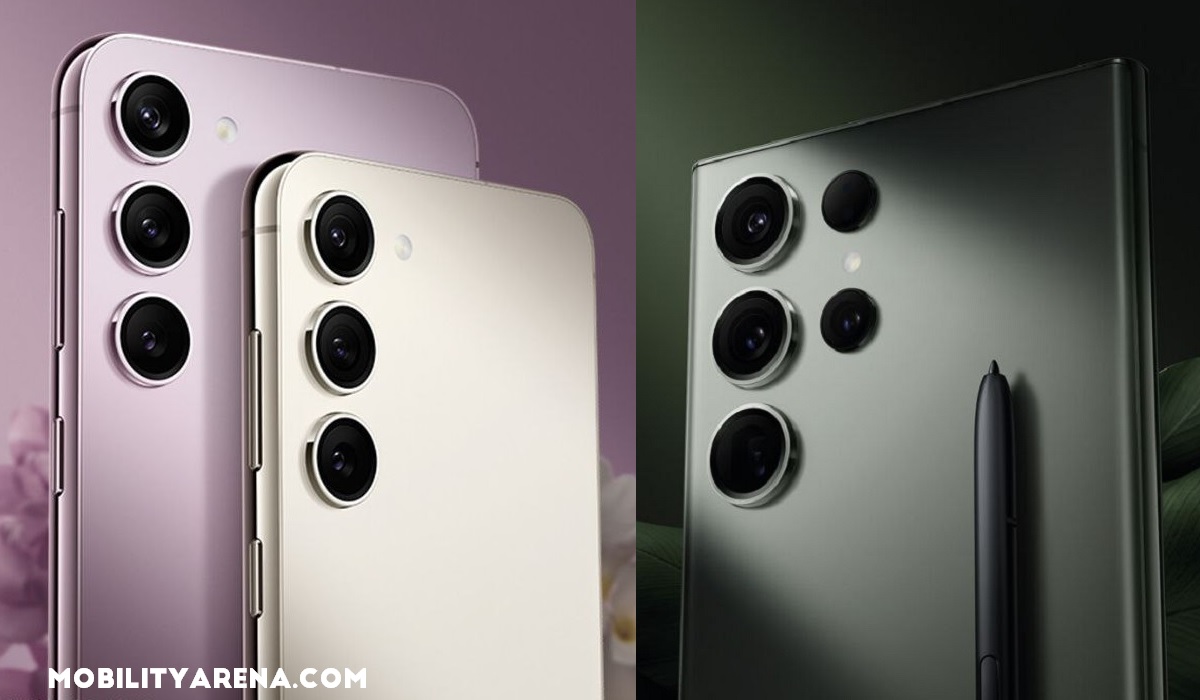
Samsung’s S23 range use ultrasonic fingerprint sensors
Ultrasonic vs Capacitive vs Optical Fingerprint Sensors, in Summary
The main differences between an Ultrasonic fingerprint sensor, a capacitive fingerprint sensor, and an optical fingerprint sensor are:
- Accuracy and Security : Ultrasonic fingerprint sensors are more accurate, and thus more secure, than optical sensors because they create a 3D image of the fingerprint, while optical sensors can only create a 2D image. Capacitive fingerprint scanners sit in the middle, in terms of accuracy.
- Speed : Traditionally, capacitive and optical sensors were initially much faster than ultrasonic fingerprint sensors. But the technology keeps maturing and the speed difference has been reduced to the barest minimum, if at all it still exists. On the Samsung Galaxy S23 which we reviewed , the 3D ultrasonic fingerprint scanner is very fast.
- Environmental conditions : Ultrasonic sensors can work even if the finger is dirty, oily, or wet, as well as in low-temperature conditions and strong sunlight. Optical sensors may have difficulty reading fingerprints in these conditions.
- Cost : Implementing an optical fingerprint scanning technology is generally less costly than implementing a capacitive or an ultrasonic fingerprint scanner. As such, optical scanners tend to be found in low-cost smartphones, capacitive in mid-range and budget smartphones, while ultrasonic scanners are found only in the most premium smartphones.
Which type of fingerprint scanner is best biometric authentication?
The answer is obvious: 3D ultrasonic fingerprint sensors are the best type for for biometric authentication in smartphones and other mobile gadgets. They offer the best accuracy, security, and have become really fast. If you can afford a premium smartphone that has one, buy it. If not, a budget device with a capacitive scanner will do just fine.
Author:Mister Mobility
Digital Skills and Communication Coach | Mobile Phone Connoisseur since 2001 | Tech Blogging since 2004
Side-mounted fingerprint
Why Side-mounted Fingerprint Scanners Are Poor For Usability
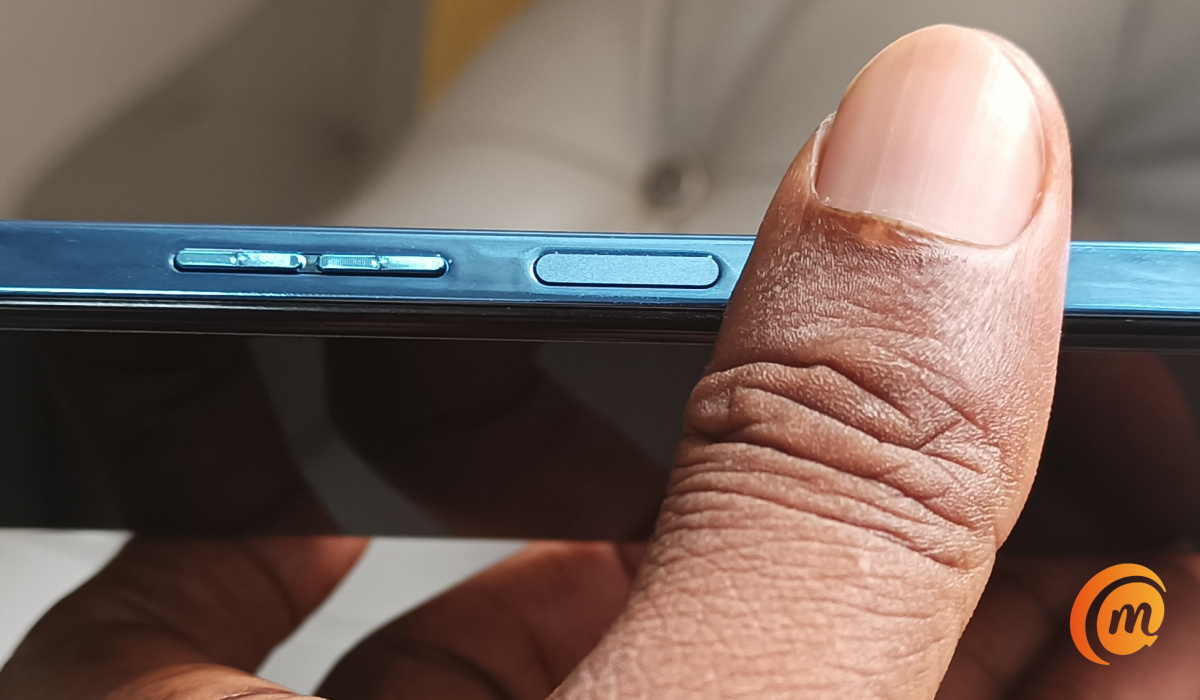
Side-mounted fingerprint scanners are not great for usability, if we are being honest. When are we getting rid of them?
Add MobilityArena as a preferred source on Google
There is no way for a person to be good at everything because everybody has weaknesses and strengths. One great thing you can do is to identify your weak points and try to improve them. It will help improve your work performance.
In this article, you will learn about the tips to improve your work performance and advance your career. Keep reading the article!

- Time Management
Whether you are a student or a worker, time management plays an important role in brightening your future. According to various studies, workers are interrupted after every 6 and 12 minutes. The distraction can have negative effects on the productivity of the employees.
Interruption can come in any form, and try to avoid it to enhance your productivity . There are many ways to manage your time while working at the workplace. One way is to set a schedule for time to minimize the distraction during your work.
Secondly, set your meeting hours. If you do your work best in the morning, make a schedule for meeting availability in the afternoon. Lastly, you can also update your working hours to improve your work performance and advance your career.
- Embrace Continuous Learning And Training
Change is happening all the time in every industry. Make sure that you are learning new tools and technologies to update your knowledge and skills. Additionally, if you require a training program to enhance soft and hard skills, you can go for it.
For instance, if you are a truck driver in a transportation company, you should have a truck license because it will be helpful for you in many ways. It can advance your career and also help improve your work performance.
If your company is in Victoria and you’re looking for license training, you can consider the license training institute over there.
To drive with authority, leading truck licence training in Victoria is available for you to enhance your career as a truck driver and also make sure you’re learning new skills to improve your work performance.
- Set Milestones For Your Professional Development
Another important tip to improve your work performance and advance your career is to set small and large goals to complete any type of project. One problem you can face while working in the workplace is that the large projects are so complex and overwhelming.
It will be difficult for you to handle such projects. However, with the setting of goals, you can complete your projects quickly and effectively. It will also improve the productivity of your work and ensure your contribution to the company.
- Improve Your Communication Skills
Whether you are a manager or not, make an ultimate goal to ensure open communication with your team members. Effective communication plays an important role in improving work performance and increasing the production of the company.
Keep in mind that communication is a two-way street; when you are not clear on certain things, you can ask your colleagues or managers. Open communication helps create a cooperative and collaborative environment at the workplace.
Author:Anna Makama
Gadget lover making my way through life one day at a time.
