Add MobilityArena as a preferred source on Google
You have (probably) heard that you can now use widgets on your iPhone . With iOS 16, widgets are now available for the iPhone lock screen, the way they were recently made available for the home screen. What are widgets? A widget is an element of a graphical user interface (GUI) that displays information or provides a specific way for you to interact with the operating system in your device.
While a widget is a piece of software, it is not an app in the real sense of the word. It is more of a graphical user interface that displays information and allows for interaction. For example, you can add a weather widget to your iPhone’s home screen, so you can have a quick glance to see what the weather for the day is expected to be.
Now that we are here at this point, you want to, need to, find out how to use widgets on your iPhone. You want to be able to add, manage, and remove them as you will. It isn’t anything difficult, and you will get the hang of it after going through this tutorial.
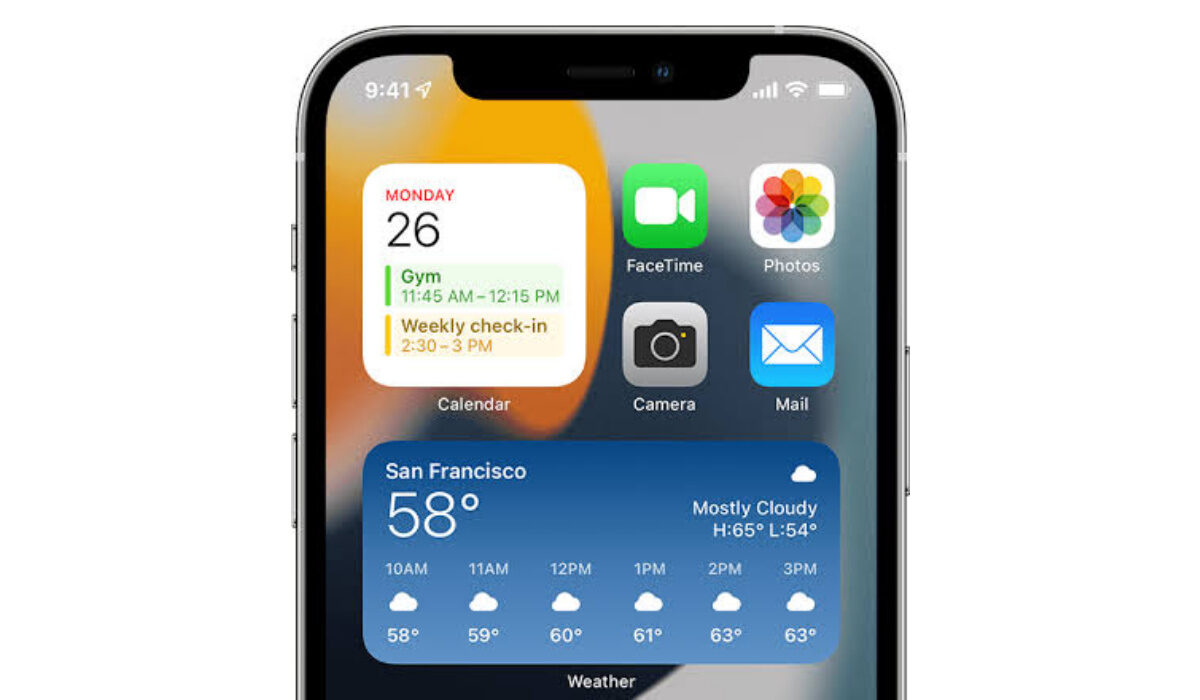
Widgets on your iPhone
How to add widgets on your iPhone or iPad
To add a widget to your home screen or lock screen, press and hold a finger down on the screen until the icons start shaking (similar to what happens when you press and hold down on an app icon). Once the icons start shaking, you will see a plus (+) sign in the top left-hand corner of the screen. Tap on it to open the widgets gallery.
Swipe through till you see the widget you want, select it and tap the Add Widget button for it to be added to your screen. Long-press your finger down on the widget and drag it to the position you want it to be. You can move it across screens, by dragging it. You can also resize the widget to suit your needs or taste.
How to remove widgets on your iPhone or iPad
To remove a widget, long-press on it and a menu will pop up. Select Remove Widget and it will simply disappear. Note that deleting a widget from your iPhone’s home screen or lock screen does not stop you from installing it again later, should you need/wish to. To re-install, simply follow the same procedure to add widgets, as already detailed above.
Can you download more widgets for iPhone?
Yes; you can always download or add more widgets for your iPhone.
How do I get new widgets?
Long-press on your iPhone’s screen, and tap on the + sign that pops up on the screen, to open the widgets gallery from where you can select as many widets as you desire.
What widgets are available for iOS?
There is a growing catalogue of widgets you can use on your Apple iPhone. They include: Weather, Smart Battery Widget, Spotify, Bears Countdown, Sports Alert, Tripit, Apollo for Reddit, Day One Journal, among others.
Do widgets drain battery?
Yes; widgets consume some power – some more than others. The more graphics intensive the widget, the more battery drain it effects.
Do widgets use memory?
Yes; widgets use some of your iPhone’s memory to run.
Do widgets use data?
Many widgets require an Internet connection to function properly. For example, the weather widget. Another is the Spotify widget. Any widget that requires an Internet connection to function well uses data. The amount is usually too small b=to be worried about.
- Don’t miss our reviews .
- Follow our news on Google News .
- Join our WhatsApp Group , to be notified of the most important articles and deals,
- Follow us on Instagram , Facebook , Twitter , and YouTube .
Author:MobileChic
That motivated, gadget-loving geeky chic who tries to stay on top of things. Unapologetic iFan.
Add MobilityArena as a preferred source on Google
The Nothing Phone 1 is a breath of fresh air among the countless hordes of drab slabs being launched in the mobile phone industry. It features a unique transparent design that catches attention, while offering a premium performance and experience.
Nothing Phone 1 in brief :
- OS: Android 12
- Release Date: 2022
- Network Type: 2G/3G/4G/5G
- Display: 6.55-inch, 1080 x 2400 pixels resolution, 120Hz OLED, Corning’s Gorilla Glass
- Processor: Qualcomm Snapdragon 778G+
- Selfie Camera: 16 MP
- Rear camera: 50 MP dual
- RAM: 8 GB / 12 GB
- ROM: 128 GB / 256 GB
- Battery: 4500mAh
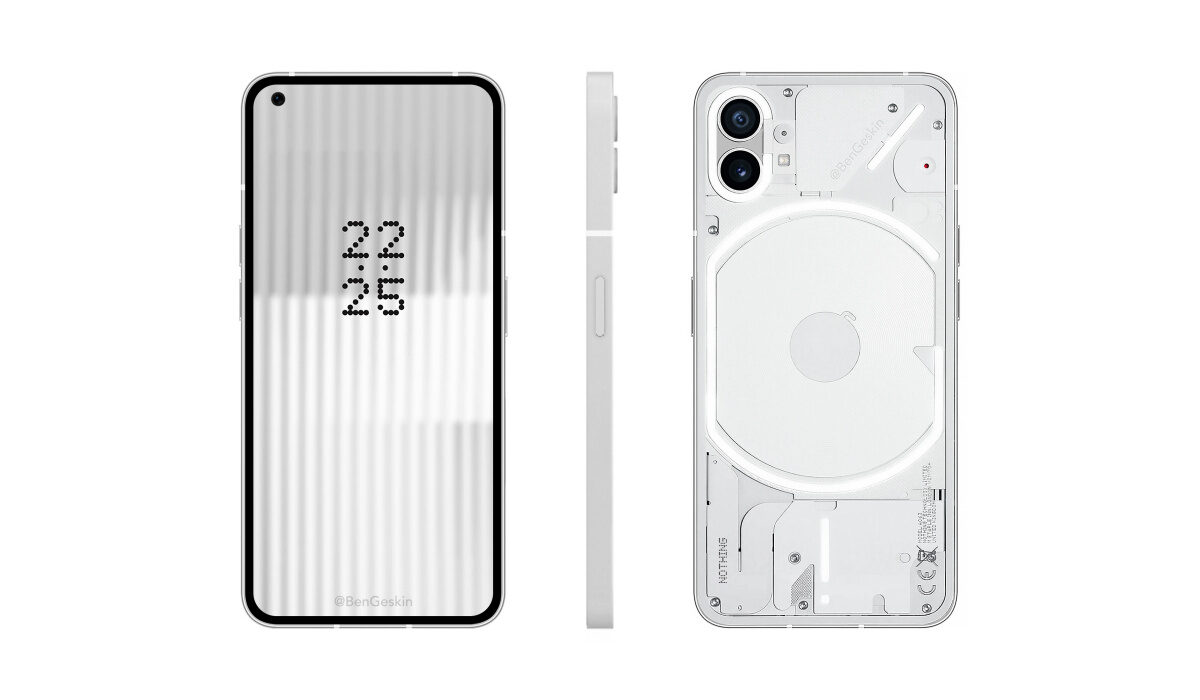
Nothing Phone 1 (White)
- Nothing Phone 1 detailed specs
- Software Updates Is Nothing Phone 1 a 4G phone? Is Nothing Phone 1 battery removable? Is Nothing Phone 1 good for gaming? Does Nothing Phone 1 support OTG? How much is Nothing Phone 1? What countries is Nothing Phone 1 on sale in? Is Nothing Phone 1 getting Android 13? Does Nothing Phone have IR blaster? Does Nothing Phone 1 have aptX Adaptive and other Bluetooth codecs? Does Nothing Phone 1 have Google Play Store? Will Nothing Phone 1 work in the USA?
Nothing Phone 1 detailed specs
Mobile Wireless Network and Software
- 2G mobile network bands : GSM, GPRS, EDGE 850 / 900 / 1800 / 1900 MHz.
- 3G mobile network bands : UMTS, WCDMA, HSDPA 850 / 900 / 1700 (AWS) / 1900 / 2100 MHz
- 4G mobile network bands : LTE 1, 2, 3, 4, 5, 7, 8, 12, 17, 18, 19, 20, 26, 28, 32, 34, 38, 39, 40, 41, 66
- 5G mobile network bands : NSA/SA 1, 3, 5, 7, 8, 20, 28, 38, 40, 41, 77, 78
- SIM Type : Nano-SIM, Dual SIM
- Software / OS : Nothing OS 1.1.7 based on pure Android 12
Design, Form Factor, Appearance
- Dimensions : 159.2 x 75.8 x 8.3 mm
- Weight : 194g
- Display : 6.55 inches, 1080 x 2400 pixels, 120 Hz refresh rate, 20:9 aspect ratio, OLED, Corning’s Gorilla Glass 5.
- Colours : White. Black.
- Physical Build : Aluminium frame; Gorilla Glass5 transparent back. IP53 splash resistance. Multiple LED lights on the back.
Internal Hardware Specs
- CPU/ Processor : 64-bit, 2.5 GHz Octa-core
- Chipset : Qualcomm Snapdragon 778G+ (6 nm)
- GPU/ Graphics Processing Unit : Adreno 642L
- RAM : 8 GB / 12 GB
- Extended/Virtual RAM :
- Internal Storage : 128 GB / 256 GB
- External Storage : No
Photography, Video Recording
- Main Camera : 50MP Sony IMX766 main sensor + 50 MP ultrawide angle lens, autofocus, LED flash, dual OIS, dual EIS, 4k@30fps, 1080p@30fps video recording
- Front Camera : 16 MP fixed focus, Face Recognition, 1080p@30fps video capture
Audio, Video Playback
- Music Support : PCM, AAC / AAC + / eAAC + / MP3 / AMR – NB / WB / APE
- Audio : 3.5 mm audio jack
- Loudspeaker : Stereo speakers
- Video Support : H.264/MP4/MPEG4 player
- FM Radio :
Phone Sensors
- Digital Compass : Yes.
- Accelerometer : Yes.
- Proximity Sensor : Yes.
- Ambient Light Sensor : Yes.
- Barometer : No.
- Pedometer : No.
- Heart Rate Monitor : No.
- Gyroscope (G-Sensor) : Yes.
- Fingerprint Scanner : Yes; in-display.
- Face Unlock : Yes.
- Iris Scanner : No.
- Motion Sensing / Gesture Control : No.
- Voice Control : No.
- Intelligent Digital Assistant : Yes; Google Assistant.
- Infra-red Blaster : No.
Connectivity Options
- Bluetooth Version : 5.2
- Bluetooth Profiles : A2DP LE
- WiFi : Wi-Fi 802.11 a/b/g/n/ac/6, hotspot
- GPS : Yes, A-GPS, GLONASS, BDS, Galileo
- USB : microUSB v2.0. Type-C. USB-OTG.
- NFC : Yes.
Miscellaneous Specs and Features
- Battery Type and Capacity : Non-Removable Lithium-Polymer 4500mAh
- Battery Charging : 33W fast charging. A charging brick is not included in the box, but a 45W brick can be purchased €35 in Europe, £35 in the UK, and INR 2,499 in India.
- Wireless Charging : Yes (5W).
- Reverse Charging : No.
- Model Version/Number : A063
Launch/Release Dates and Information
- Announced : July 12, 2022
- Release Date : July 21, 2022
Nothing Phone 1 Prices by Country
- USA: $397 (Not officially available in the United States).
- United Kingdom : £399 (8/128 GB). £449 (8/256 GB). £499 (12/256 GB).
- Germany & European Union : €469.99 (8/128 GB). €499.99 (8/256 GB). €549.99 (12/256 GB).
- Switzerland : CHF 462
- Australia : AU$ 799
- South Africa : ZAR 7,999
- Nigeria : ₦310,000 (8/128 GB). ₦330,000 (8/256 GB)
- Egypt : from EGP 4,752
- UAE : from AED 1,899
- Kenya : from Ksh.
- Ghana : GH₵
- India : ₹ 32,999 (8/128 GB). ₹35,999 (8/256 GB). ₹ 38,999 (12/256 GB)
- Iraq : Iraqi Dinar 459,503
- Bahrain : BHD 175
Many of the above prices are rough conversions, as the Nothing Phone One is not officially available in many countries. The above prices may change with time from country to country, as market forces and economic policies influence product price movements.
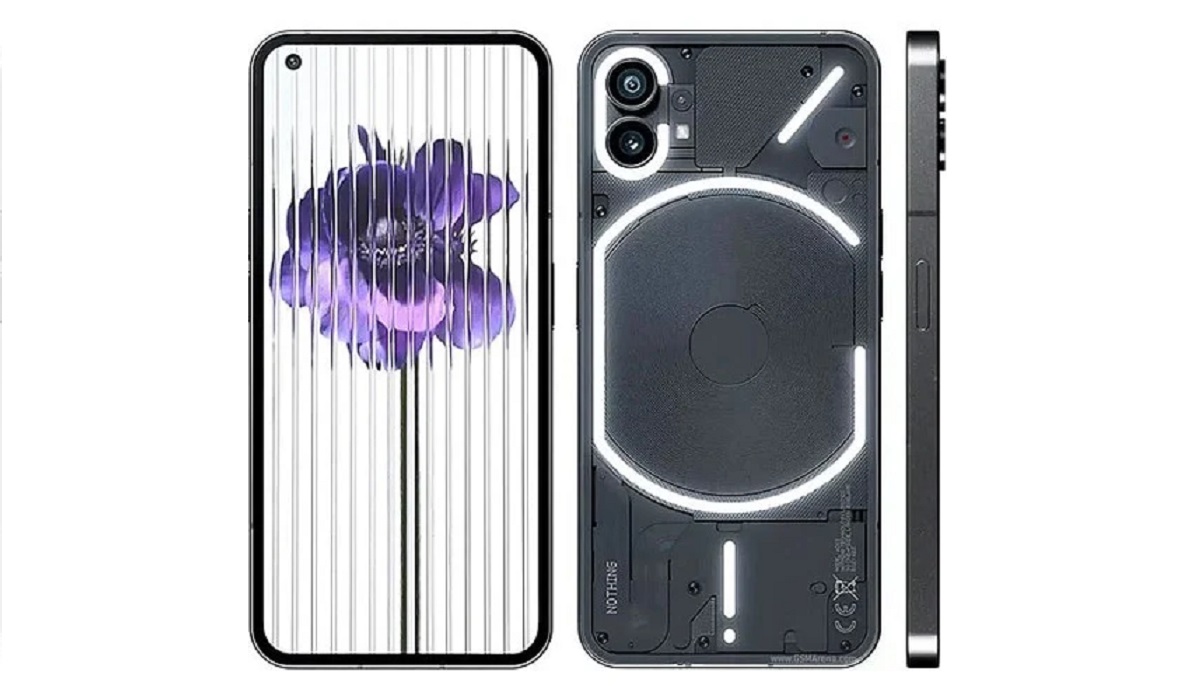
Nothing Phone 1 (Black)
Software Updates
February 16, 2023 : Nothing OS 1.5.2 begins rolling out to Nothing Phone 1. This software update includes a stable build of Android 13, as well as the January 2023 security patch.
Is Nothing Phone 1 a 4G phone?
This smartphone supports 2G, 3G, 4G, and 5G wireless networks.
Is Nothing Phone 1 battery removable?
The battery is non-removable.
Is Nothing Phone 1 good for gaming?
The phone has an upper mid-range processor and can handle all but the most demanding games you can throw at it.
Does Nothing Phone 1 support OTG?
Yes; it does
How much is Nothing Phone 1?
The price of Nothing Phone (1) starts from £399 in the United Kingdom, and €469.99 in Europe.
What countries is Nothing Phone 1 on sale in?
The Phone 1 is officially available in the UK, Denmark, Finland, France, Germany, Hong Kong, Hungary, India, Israel, Italy, Macau, Malaysia, the Netherlands, Norway, Philippines, Poland, Portugal, Romania, Saudi Arabia, Spain, Singapore, Sweden, Switzerland, Taiwan, Thailand, and UAE.
Is Nothing Phone 1 getting Android 13?
Yes, it is. Android 13 update began rolling out in the middle of February 2023.
Does Nothing Phone have IR blaster?
Like most other smartphones out there, Nothing Phone 1 does not have an IR blaster.
Does Nothing Phone 1 have aptX Adaptive and other Bluetooth codecs?
The Nothing Phone 1 supports a variety of Bluetooth codecs, including aptX Adaptive . It also supports other codecs such as aptX HD , aptX , and AAC , among others. This means you can enjoy high-quality audio performance over Bluetooth with compatible devices.
Does Nothing Phone 1 have Google Play Store?
It supports Google Services and software applications, including Play Store and Maps, Gmail, YouTube, and others.
Will Nothing Phone 1 work in the USA?
This is a GSM phone and is supported on US GSM carriers like AT&T and T-Mobile and other networks riding on their networks. It does not support CDMA networks. Nothing Technology says they won’t be shipping to the USA, though you can always make your own arrangements to ship it in.
MobilityArena Buyer’s Guide Verdict
The specification of the Nothing Phone 1 makes it a mid-range smartphone. The manufacturer has said that the phone will not be available in the USA and other regions, because their primary focus is the UK and the EU. It delivers solid performance (close to flagship level) in a unique body. If you want a Google Pixel-like user experience in an iPhone-esque body, the Nothing Phone 1 is what the doctor ordered.
Our Buyer’s Guide Verdict is a recommendation based on the specificationss of the device and a general guide to help you understand how much value a device offers for its price. It is not an endorsement of the device. Ask questions and use your judgement when buying any device; MobilityArena takes no responsibility for your buying decisions .
Nothing Phone 1 Review Rating
4.5/5.0.
Related Resource
Nothing Phone (2)
