Add MobilityArena as a preferred source on Google
Redmi A1 Plus was released in September 2022. It is an entry-level smartphone and is currently the lowest smartphone in Xiaomi’s line-up of phones. The brand is not exactly known for entry-level phones, but it is having a go again after the experiment with Redmi Go back in 2019. If you have been looking for an entry-level Android phone by Xiaomi, here it is.
Let’s get the core specs out of the way. The Redmi A1 Plus uses a lowly Helio A22 chipset/processor, and has two memory variants – 2GB RAM + 32 GB ROM, and 3GB RAM + 32GB ROM. Of course, the variant with more RAM provides a fairly better performance when it comes to opening and running apps.
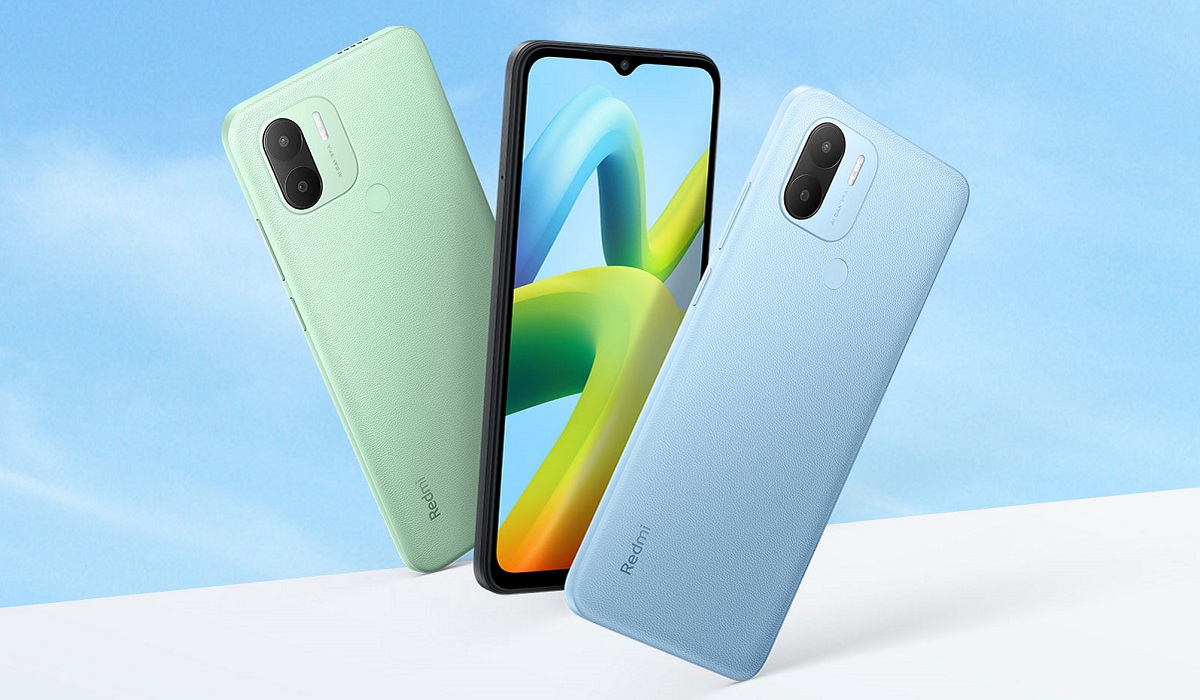
Xiaomi Redmi A1 Plus is an entry-level smartphone
The IPS LCD panel is 6.52 inches in size, diagonally, and has no glass protection or higher refresh rate. The battery capacity is 5000mAh, and there is 10W charging to go with it. There is a 3.5mm audio headphone jack. For photography and video recording, it has a 5MP selfie camera and an 8MP rear camera with a QVGA secondary lens.
- Redmi A1 Plus Review: In The Box
- Does Redmi A1 Plus have a fingerprint scanner?
- Does Redmi A1 Plus have an IR blaster?
- Redmi A1 Plus Review: Performance
- Xiaomi Redmi A1 Plus Review: Camera Quality
- Battery Life
- Final Words
Redmi A1 Plus Review: In The Box
Here are the items you get in the box when you open it.
- The phone itself
- 10W charging adapter.
- USB-C cable
- SIM ejector tool
- Documentation: Warranty card, safety information card, and a quick start guide.
The Redmi A1 Plus unit we got our hands on is the Light Blue colour scheme. We think it is the best looking of the available colours, too. Other colours include Light Green, and Black.
Does Redmi A1 Plus have a fingerprint scanner?
If there is one feature that is often sacrificed in entry-level Android smartphones, it is the fingerprint scanner. Does Xiaomi sacrifice it in the Redmi A1 Plus? Thankfully, no. The company did a clever thing: it has a separate model called Redmi A1 that lacks the fingerprint scanner and costs just a little less. Everything else on the Redmi A1 and A1 Plus are the same apart from the fingerprint scanner. They look exactly the same, too, minus the scanner at the back.
This is a smart move, in my books. Every other Android phone brand should copy it: make two variants of your entry-level model – one with a fingerprint reader and the other without; don’t bump any other specs and make the price difference very minimal.
Does Redmi A1 Plus have an IR blaster?
Xiaomi fans know that their favourite phone brand includes an infra-red port (AKA IR blaster) in their phones. Does Redmi A1 Plus have one? Sorry guys, but it does not. As an entry-level smartphone, Redmi A1 Plus excludes the IR blaster in order to keep the price down. If you really want an affordable smartphone with an IR blaster, you should consider one of the Redmi Note phones out there. Of course, you can buy this and add an IR blaster to it .
Redmi A1 Plus Review: Performance
When the phone powers up, you will immediately notice that Xiaomi’s custom user interface is missing. Yes, MIUI does not exist in the Redmi A1+. Instead, we have stock Android (Go Edition). The whole idea behind this is to provide better performance for the phone, considering that it uses an entry-level processor. Custom Android skins are an extra layer of work for smartphone processors to run.
As such, Redmi A1 Plus runs fairly smoothly – quite good for its class. Xiaomi fans may miss MIUI, but I believe this is a good call by Xiaomi. Its predecessor, Redmi Go, also ran stock Android; MIUI was absent in that phone, too. Launching and switching between apps is fairly painless, if you do not push it harder than you should. This is an entry-level phone, after all, and is not equipped with a powerful chipset. But you will notice the difference in performance when you open and switch between apps between the Redmi Go and its competition from other brands.
Xiaomi Redmi A1 Plus Review: Camera Quality
There is a reason why the best camera phones are flagship devices: great cameras are costly. As such, you better not be buying the A1 Plus for great photography. The cameras are decent for the price range, but do not expect Nobel prize quality photos.
As such, in good lighting, Redmi A1 Plus shoots decent photos. Nothing fantastic, but in its class, it does a good job. The results are within the range of what to expect from an entry-level Android phone.
Battery Life
With a 5000mAh battery, we were expecting decent battery life. The Redmi A1 Plus did not disappoint. With a full charge, I easily went for a full day at work without needing to look for a charger. Of course, with more intensive use during the day, you will need to top it up at some point in time. And speaking of charging, what you get is 10W charging. It isn’t much faster than regular charging, but it helps. And for the price, it is a fair thing.
Final Words
Redmi A1 Plus is a breath of fresh air at the low-end Android phone market. If you want an entry-level Android smartphone that you will enjoy using, this is one. The 2/32GB variant costs around €110 in Europe, about £ 93 in the UK, around ₦58,000 in Nigeria, and Ksh 8,999 in Kenya. If you can afford to spend a little more, get the 3GB RAM variant; it will give you even better performance.
Author:InfoDesk
Add MobilityArena as a preferred source on Google
Redmi A1 Plus was released in September 2022. It is an entry-level smartphone and is currently the lowest smartphone in Xiaomi’s line-up of phones. The brand is not exactly known for entry-level phones, but it is having a go again after the experiment with Redmi Go back in 2019. If you have been looking for an entry-level Android phone by Xiaomi, here it is.
Let’s get the core specs out of the way. The Redmi A1 Plus uses a lowly Helio A22 chipset/processor, and has two memory variants – 2GB RAM + 32 GB ROM, and 3GB RAM + 32GB ROM. Of course, the variant with more RAM provides a fairly better performance when it comes to opening and running apps.
Xiaomi Redmi A1 Plus is an entry-level smartphone
The IPS LCD panel is 6.52 inches in size, diagonally, and has no glass protection or higher refresh rate. The battery capacity is 5000mAh, and there is 10W charging to go with it. There is a 3.5mm audio headphone jack. For photography and video recording, it has a 5MP selfie camera and an 8MP rear camera with a QVGA secondary lens.
- Redmi A1 Plus Review: In The Box
- Does Redmi A1 Plus have a fingerprint scanner?
- Does Redmi A1 Plus have an IR blaster?
- Redmi A1 Plus Review: Performance
- Xiaomi Redmi A1 Plus Review: Camera Quality
- Battery Life
- Final Words
Redmi A1 Plus Review: In The Box
Here are the items you get in the box when you open it.
- The phone itself
- 10W charging adapter.
- USB-C cable
- SIM ejector tool
- Documentation: Warranty card, safety information card, and a quick start guide.
The Redmi A1 Plus unit we got our hands on is the Light Blue colour scheme. We think it is the best looking of the available colours, too. Other colours include Light Green, and Black.
Does Redmi A1 Plus have a fingerprint scanner?
If there is one feature that is often sacrificed in entry-level Android smartphones, it is the fingerprint scanner. Does Xiaomi sacrifice it in the Redmi A1 Plus? Thankfully, no. The company did a clever thing: it has a separate model called Redmi A1 that lacks the fingerprint scanner and costs just a little less. Everything else on the Redmi A1 and A1 Plus are the same apart from the fingerprint scanner. They look exactly the same, too, minus the scanner at the back.
This is a smart move, in my books. Every other Android phone brand should copy it: make two variants of your entry-level model – one with a fingerprint reader and the other without; don’t bump any other specs and make the price difference very minimal.
Does Redmi A1 Plus have an IR blaster?
Xiaomi fans know that their favourite phone brand includes an infra-red port (AKA IR blaster) in their phones. Does Redmi A1 Plus have one? Sorry guys, but it does not. As an entry-level smartphone, Redmi A1 Plus excludes the IR blaster in order to keep the price down. If you really want an affordable smartphone with an IR blaster, you should consider one of the Redmi Note phones out there. Of course, you can buy this and add an IR blaster to it .
Redmi A1 Plus Review: Performance
When the phone powers up, you will immediately notice that Xiaomi’s custom user interface is missing. Yes, MIUI does not exist in the Redmi A1+. Instead, we have stock Android (Go Edition). The whole idea behind this is to provide better performance for the phone, considering that it uses an entry-level processor. Custom Android skins are an extra layer of work for smartphone processors to run.
As such, Redmi A1 Plus runs fairly smoothly – quite good for its class. Xiaomi fans may miss MIUI, but I believe this is a good call by Xiaomi. Its predecessor, Redmi Go, also ran stock Android; MIUI was absent in that phone, too. Launching and switching between apps is fairly painless, if you do not push it harder than you should. This is an entry-level phone, after all, and is not equipped with a powerful chipset. But you will notice the difference in performance when you open and switch between apps between the Redmi Go and its competition from other brands.
Xiaomi Redmi A1 Plus Review: Camera Quality
There is a reason why the best camera phones are flagship devices: great cameras are costly. As such, you better not be buying the A1 Plus for great photography. The cameras are decent for the price range, but do not expect Nobel prize quality photos.
As such, in good lighting, Redmi A1 Plus shoots decent photos. Nothing fantastic, but in its class, it does a good job. The results are within the range of what to expect from an entry-level Android phone.
Battery Life
With a 5000mAh battery, we were expecting decent battery life. The Redmi A1 Plus did not disappoint. With a full charge, I easily went for a full day at work without needing to look for a charger. Of course, with more intensive use during the day, you will need to top it up at some point in time. And speaking of charging, what you get is 10W charging. It isn’t much faster than regular charging, but it helps. And for the price, it is a fair thing.
Final Words
Redmi A1 Plus is a breath of fresh air at the low-end Android phone market. If you want an entry-level Android smartphone that you will enjoy using, this is one. The 2/32GB variant costs around €110 in Europe, about £ 93 in the UK, around ₦58,000 in Nigeria, and Ksh 8,999 in Kenya. If you can afford to spend a little more, get the 3GB RAM variant; it will give you even better performance.
Author:InfoDesk
Add MobilityArena as a preferred source on Google
Are you in search of how to watch anime offline on your mobile device? In the bustling world of anime, there’s always a new show to catch or an old favorite to rewatch. But what if you’re on the go, without access to Wi-Fi or mobile data ? Fear not, anime enthusiasts! This guide is designed for you. Whether you’re an iPhone or Android user, we’ve got you covered. We’ll walk you through the steps to download and watch your beloved anime series offline, ensuring your anime adventures continue uninterrupted.
Since anime became popular worldwide, thousands of anime series are now available, with more than 50 million anime lovers worldwide. However, given that anime shows aren’t usually broadcast like typical Western series, it can be a bit tricky to locate the best anime streaming applications.
This is why it is great that you can watch anime for free on some apps and websites. Some of these options even allow for cross-platform offline viewing. Therefore, if you’re wondering where to watch anime and download it for offline watching, we’ve created this guide for you. Below, we’ve described the best apps to watch anime offline on Android and iOS devices.

What are the Best Apps To Watch Anime Offline on Android and iOS?
There are several options among the best anime apps for offline viewing, and we’ve described some of them below:
Crunchyroll
It’s possible that you’ve already heard of Crunchyroll if you’re a die-hard anime fan, especially since it is one of the very best ways to watch anime offline. Crunchyroll boasts the largest anime collection and has more than 50 million registered members worldwide. It is the leading anime-streaming platform in the US. Additionally, you can browse different media, such as manga and Asian dramas.
You have the option to try out the Crunchyroll app on Android or iOS for 14 days if you’re a first-time user. With this, there’s typically a limited window of time to enjoy its premium features, which include ad-free HD streaming and unrestricted access to all its content.
AnimeLab
Another option among the best apps you can download to watch anime offline is AnimeLab, and you’ll love that it offers free streaming of many different anime shows. It offers over 718 movies and series in 32 different categories, and if your favorite anime isn’t listed, you can easily request it. AnimeLab offers the most well-liked anime shows and movies, and also features simulcasts straight from Japan. This service only works for Australia and New Zealand though.
AnimeLab’s broad availability is what sets it apart from most other platforms. Due to this feature, users can connect their accounts to many devices for personal viewing.
Note that you can only watch a small selection of movies with English subtitles if you use the free version. However, if you decide to purchase the premium plan, you’ll get complete access to the library, have the option to stream in HD, and may pick between the subtitled and dub versions.
Netflix
When it comes to watching anime, Netflix may not be your first pick. Nonetheless, many of the most interesting and popular anime series are available on the platform. Therefore, some people still regard it as one of the best ways to watch anime offline. Also, as Netflix is collaborating with Japanese animation firms like Studio Ghibli in the upcoming years, we may be anticipating an increase in anime collections on Netflix’s platform.
FuminationNow
Without FunimationNow, any list submission including the best anime apps for offline viewing would be incomplete. The company has a lengthy history of offering American consumers anime titles, and it now features more than 950 anime shows.
If you enjoy watching dubbed anime, FunimationNow is a good option. The company’s main objective is to release anime series in dubbed forms, even if it also provides subbed anime versions. Additionally, the service works with both iOS and Android devices.
Regarding the subscription, moving up to the premium tier offers you access to two simultaneous streams across all of your connected devices, while upgrading to the premium plus tier gives you access to up to five simultaneous streams. The premium plus tier gives you the opportunity to view anime shows offline, making FuminationNow one of the best ways to watch anime offline.
In summary , there are several options to consider if you’re looking for the best anime apps for offline viewing. This guide will give you a headstart on the right places to look.
