Add MobilityArena as a preferred source on Google
Google Lens first appeared as a standalone app for iPhone users, and then was made available for Android users. Then Google added Lens to the Photos app for Android. With the latest update, Lens has now been built directly into the Google camera app.
This means that you no longer have to go through Google Assistant or Google Photos to access Lens. Just launch the official Google camera app and Lens is waiting for you to use. Becaue the camera app is one of the most used apps in a smartphone, this is a big boost for Google Lens.
What is even sweeter is that new smart features have been added into the service.
The re-designed camera has also been integrated with AR and Google Maps features, so that instead of seeing regular lines and dots like you do on Maps, your camera will help you navigate in real time. Your camera becomes an easy to use guide.
Lens in the camera will also recognize and understand words, which you can select, copy and paste directly into other apps for use e.g. Office, email, etc.
Ladies in the house will love a feature called Style Match! Let’s say you see a picture of a woman in a lovely dress that you absolutely want for yourself. Simply open the camera app and point it at the dress, tap the lens icon and the camera will provide you with options of matching gowns, plus the price and location where you can get it.
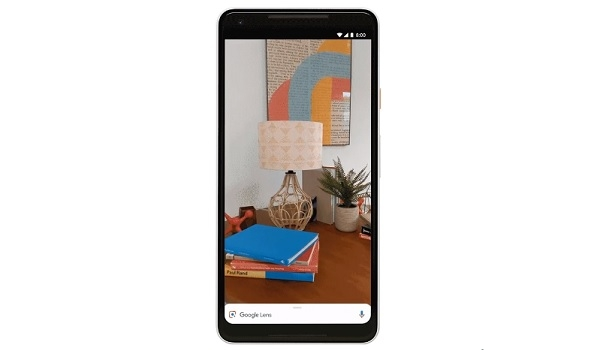
Google Lens In Camera: The Compatible Smartphones
Unfortunately, the new Google Lens built into the Google camera is not available for all Android smartphones. In addition to Pixel devices by Google itself, Android One smartphones from the following brands will get the new Lens as integrated in the camera: Asus, BQ, HMD/Nokia, LGE, Motorola, OnePlus, Xiaomi, Sony Mobile, TCL, and Transsion (TECNO, Infinix, itel).
- Don’t miss our reviews .
- Join our WhatsApp Group , to be notified of the most important articles and deals,
- Follow us on Instagram , Facebook , Twitter , and YouTube .
Author:InfoDesk
Add MobilityArena as a preferred source on Google
Peer pressure is the influence on you to behave in a certain way because your friends or people in your group expect it. Most times, peer pressure is used in the context of being a bad thing. However, auto maker, Chevrolet, have found a way to put it to good use and keep you safe while driving.
The car maker has created an app that would help train and teach distracted drivers to focus more on the road than on their phones. Peer pressure mostly comes from friends and that is what this app, called Call Me Out, does. It uses recorded messages from your friends and family members to remind you to keep your hands off your phone and your eye on the road.
Apart from the fact that it does a serious job of encouraging you not to use your phones, the app also includes a leaderboard and rankings, so that adhering to the instructions gives the user more points. Your points can be seen by all users of this app. This is real good, as it encourages the spirit of competition.
How Call Me Out uses peer pressure to keep you safe
First, you have to download the app. Once downloaded, you need to have your friends or family members record a “Call out” message on the app. This is a voice message reminding you to concentrate on the road. The recorded message can be of any kind. There is no need to be all formal about it.
The app works using the GPS and accelerometer that is built into your phone, so it detects when the phone is handled when travelling more than 8km/h. When you handle the phone, the app plays those recorded messages telling you, the driver, to focus on the road.
Handling the phone while driving automatically activates the recorded messages and it starts playing. If you ignore the phone all through your drive, you get added points in your leaderboard.
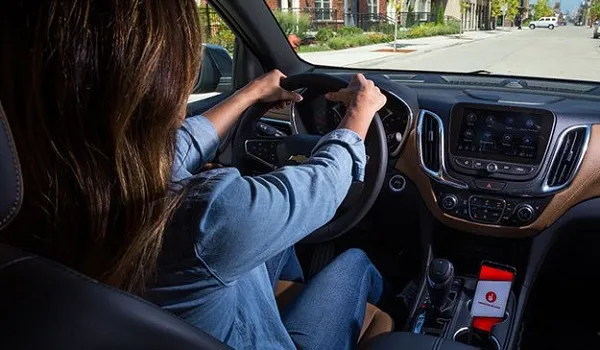
Call Me Out App Availability
Chevrolet has this to say about the app: “With Call Me Out, we are extending our commitment beyond the technologies integrated into GM and Chevy vehicles and are making the app available for Android phone users who drive other vehicle makes and models.” That is a very noble move.
Though Chevrolet says it is available for all Android users but checking Google Play, I could not find it. My thought was perhaps it isn’t available to my location yet, and I was right. Using the direct download link, I got: “This item is not available in your country.” Just when a developer says “..all Android Users”. Oh well.
Anyway, thumbs up to Chevrolet for this nifty application of peer pressure in fighting distracted driving . Obviously they don’t just care about the sales of their cars but also about the safety of motorists out there.
Author:MobileChic
That motivated, gadget-loving geeky chic who tries to stay on top of things. Unapologetic iFan.
