Add MobilityArena as a preferred source on Google
There are a lot of puzzle games on the Android platform right now. So many, in fact, that you might lose track of which ones are really worth your time. No matter your choice of puzzle games, however, it will be a good idea to check out this one called ZHED.
The game app is developed by the team of Ground Control Solutions and is a numerical brain-teasing puzzle game that truly challenges your abilities.
How to Play ZHED
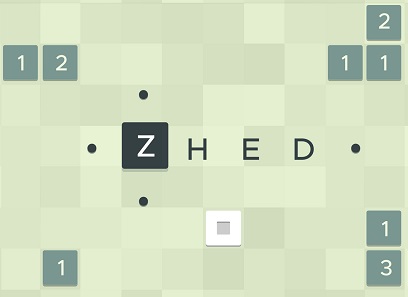
ZHED is an instant classic among puzzle games. The objective of the game is to unlock a path to the exit of the stage. To play this game, tap on a square and select a direction. You can select either up, down, left or right. See how the square reacts when they intersect, and build a path to fill the target square.
The game has no timers, clocks, stars, or tricks. It is just pure puzzles for you to enjoy at your own pace. If you are connected to the Internet while playing, your game progress is automatically saved.
This mobile game is perfect for fans of brain-teasers and complex puzzle challenges. It involves your focus, concentration, and memory. The best part? It is free. So check out this game on the Google Play Store and the Apple App Store.
Download ZHED
Download for Android | Download for iPhone .
- Don’t miss our reviews .
- Follow our news on Google News .
- Join our WhatsApp Group , to be notified of the most important articles and deals,
- Follow us on Instagram , Facebook , Twitter , and YouTube .
Author:EmmyCN
Add MobilityArena as a preferred source on Google
A lot of people like to use their smartphones late at night, or when it is dark. The thing is, prolonged exposure to the bright lights of your phone screen is bad for your health. For one thing, it disrupts your sleep cycle, which is a dangerous thing. One way to reduce the effect of the bright screen on your eyes is to reduce the brightness. However, some smartphones have really bright screens, so even the lowest brightness setting is too bright. Dim it further with these two apps, Night Mode and Dimly:
- Night Mode: This app reduces the brightness of your screen further than the default Android setting. All you need to do is download and install the app. then launch it, and you will be presented with an option to set your screen brightness. Push the slide backwards till it reaches your desired brightness level, then press Start. It automatically dims your screen.
- Dimly: This app works similar to Night Mode. Once you install the app, anytime you launch it, you will see the dialogue box on your Hone screen. You can change the setting by tapping on the down-pointing arrow on the app’s home screen, then tapping on the gear icon. Note that you can adjust the brightness directly from the Home screen.
- Don’t miss our reviews .
- Join our WhatsApp Group , to be notified of the most important articles and deals,
- Follow us on Instagram , Facebook , Twitter , and YouTube .
